
How to Sign a Scanned PDF Contract Online Free (Without Printing & Scanning)
The Paperless Dilemma: Why Printing & Re-Scanning Contracts is Obsolete
You receive an urgent email containing a 25-page residential lease agreement, freelance non-disclosure agreement (NDA), consulting statement of work (SOW), or commercial vendor contract. The document has already been countersigned by the other party, scanned, and delivered as a flat PDF image. A yellow highlight on page 24 points to a clean horizontal line marked Signature: _______________________ and Date: _________. With our edit a scanned PDF, everything runs locally in your browser with zero file uploads.
For decades, completing this simple transaction meant enduring an excruciating physical ritual known as the "print-sign-scan" cycle: For deeper troubleshooting, see our guide on how to edit a scanned certificate PDF.
- Sending 25 pages of confidential commercial terms to an office printer, burning paper and expensive toner cartridges.
- Hunting down a working blue or black ink pen and scribbling your physical signature on the final page.
- Feeding the paper stack through an automatic document feeder (ADF) or snapping unevenly lit photographs on a mobile phone camera.
- Wrestling with crooked skew angles, dark gutter shadows, bloated 40 MB file attachments, and disposing of sensitive physical paper containing financial terms.
Beyond being slow, costly, and environmentally wasteful, printing and re-scanning documents drastically degrades visual resolution. Fine contractual typography becomes fuzzy, critical decimal points in compensation tables vanish, and automated document intake scripts reject the resulting blurry file.
The Solution: Pure Client-Side In-Browser Execution. With EditScannedPDF Digital Signature Tool, you can sign any scanned contract in less than 30 seconds directly inside your web browser. Utilizing high-resolution HTML5 canvas rendering and WebAssembly, you draw a natural vector signature, stamp it onto the document with sub-pixel alignment, attach contemporaneous date markers, and export a legally binding, flattened PDF. Crucially, your confidential contracts never upload to third-party cloud servers—preserving complete commercial privacy under strict client-side isolation.
4 Steps to Sign Any Scanned PDF Contract Online (Step-by-Step)
Signing and finalizing a scanned contract takes under a minute. Follow these four practical steps using our browser-based engine:
Open Digital Signature PDF and drag your scanned contract into the viewport. The file loads instantly into local browser RAM via WebAssembly with zero cloud server transit.
Draw a natural vector signature with your mouse, trackpad, or touchscreen stylus, type a stylized script signature, or upload a transparent PNG scan of your physical pen signature.
Drag your signature onto the designated execution block. Use the integrated text tool to insert your printed legal name, corporate title, and today's contemporaneous execution date.
Click "Export Signed PDF". The WebAssembly engine bakes the signature layer directly into the underlying document canvas, permanently preventing extraction, and downloads the file instantly.
Technical Signature Mechanics: Canvas Vector Overlays & Raster Flattening
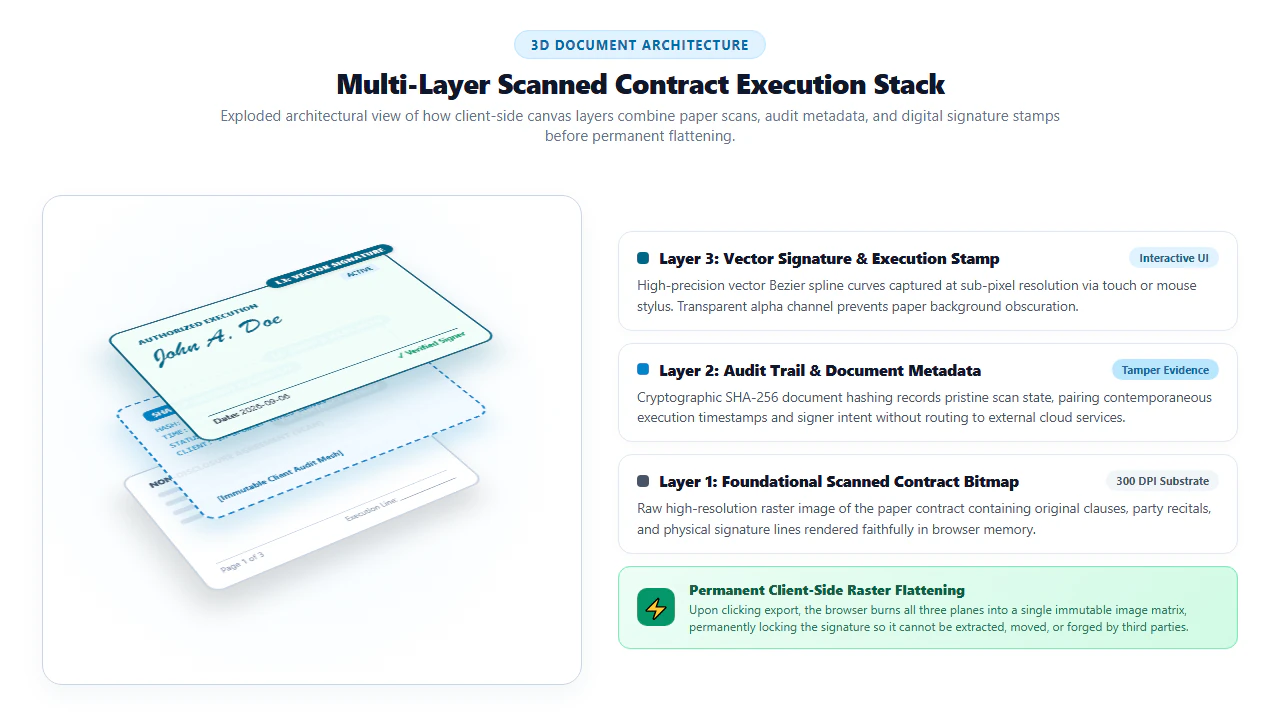
How does our digital signing technology maintain both fluid visual realism and impenetrable document security? The answer lies in the interaction between three decoupled document layers and hardware-accelerated raster synthesis:
1. The Three Architectural Document Layers
- Layer 1 (The Foundational Raster Substrate): When a scanned contract is imported, our engine renders each page at native scan resolution (typically 300 DPI) onto an off-screen HTML5 canvas buffer. Paper texture, pre-printed text, and pre-existing counterparty signatures remain locked as immutable background pixels.
- Layer 2 (The Vector Signature Dynamic Overlay): When you draw your signature using a mouse or capacitive stylus, our engine captures input coordinates at 120 Hz. Points are interpolated using quadratic Bézier curve splines with dynamic pressure weighting, producing smooth, organic pen strokes without jagged staircase artifacts.
- Layer 3 (The Annotation Dictionary & Metadata Stream): Contemporaneous date stamps, printed party names, and corporate titles are rendered as crisp vector fonts positioned at precise Cartesian coordinates
(x, y).
2. The Imperative of Permanent Canvas Flattening
A dangerous vulnerability common to basic PDF viewers is leaving signatures as "floating annotations" or separate Form XObjects. In unflattened PDFs, anyone who opens the document can click on your signature image, copy it to their clipboard, drag it into Photoshop, or paste it onto unauthorized promissory notes.
EditScannedPDF.com eliminates this threat through destructive canvas raster flattening. Upon export, the WebAssembly engine compiles Layer 1, Layer 2, and Layer 3 into a unified, consolidated bitmap. Your signature becomes an inseparable physical constituent of the page pixels. It cannot be selected as an isolated graphic, detached, or stripped by document inspection tools.
- High-Resolution Browser Canvas: Launch Chrome, Edge, Firefox, or Safari on Windows, Mac, or Linux. Drag your multi-page legal agreement into Digital Signature PDF. The document processes instantly in client RAM.
- Dual Input Precision (Draw, Type, or Stamp): Create your signature using your mouse, trackpad, or connected digital drawing tablet. Alternatively, upload a clean, transparent PNG image of your physical signature written on white paper.
- Sub-Pixel Grid Positioning: Use keyboard arrow keys or mouse dragging to position the signature precisely atop the dotted signature line. Adjust dimensions proportionally to match standard contract font sizes.
- Contemporaneous Field Population: Click "Add Text" to type your full legal name, corporate title (e.g., Managing Partner, Director), and today's date directly beside your signature block.
- Instant Client-Side Export: Export your finalized contract. Verify in your network monitor that zero bytes were transmitted to external servers during the entire session.
- Zero-Install Mobile Browser Signing: Open Safari on iPhone/iPad or Chrome on Android. Navigate directly to EditScannedPDF.com without downloading bulky native apps or creating subscription accounts.
- Direct Cloud & Local Drive Ingestion: Tap to select agreements directly from the iOS Files app, iCloud Drive, Google Drive, or email attachments.
- Natural Capacitive Stylus Drawing: Use your fingertip, Apple Pencil, or Samsung S-Pen to sign directly on the touchscreen. Our high-frequency touch listener captures subtle pen loops and flourishes with natural handwriting physics.
- Pinch-to-Zoom Placement: Use two-finger pinch gestures to zoom smoothly into the signature area. Tap and drop your signature directly onto the baseline.
- Zero Data Cellular Save: Download the signed agreement directly back to your device storage without burning cellular data bandwidth on large cloud uploads.
Enterprise Contract Execution Scenarios & Enforceability Guarantee
From multinational commercial operations to independent contractor relationships, signing scanned contracts online provides immediate operational velocity:
1. Commercial Real Estate Leases, Residential Tenancies & Subleases
Property managers and prospective tenants routinely exchange scanned multi-page lease packets, pet addendums, and move-in inspection checklists. Rather than requiring tenants to locate an office supply store with scanning facilities, in-browser signing enables instant lease execution from a smartphone or laptop, accelerating lease turnover and securing security deposits in minutes.
2. Corporate Non-Disclosure Agreements (NDAs) & Vendor SOWs
Corporate deal teams and procurement departments cannot afford multi-day delays waiting for counterparty wet-ink signatures on mutual NDAs or consulting Statements of Work. In-browser signing allows business development executives to countersign scanned agreements immediately, satisfying corporate compliance while keeping proprietary IP under strict client-side isolation.
3. Financial Loan Promissory Notes, Vendor Invoices & Bill of Sale
Small businesses, freelancers, and independent contractors execute equipment financing agreements, vehicle bills of sale, and delayed invoice settlement terms on paper forms. Affixing verified electronic signatures along with contemporaneous dates provides binding documentary evidence of mutual assent under state commercial codes.
At EditScannedPDF.com, your legally sensitive contracts and personal signatures never enter remote cloud storage or corporate tracking databases.
- Air-Gapped Client-Side Processing: Signature rendering, canvas placement, and raster flattening execute 100% inside your local device memory.
- Zero Signature Re-Use Risk: We never store, catalogue, or index your personal signature strokes on remote servers.
- Permanent Anti-Theft Flattening: Signatures are burned into the base canvas, preventing malicious actors from copying or isolating your signature graphic.
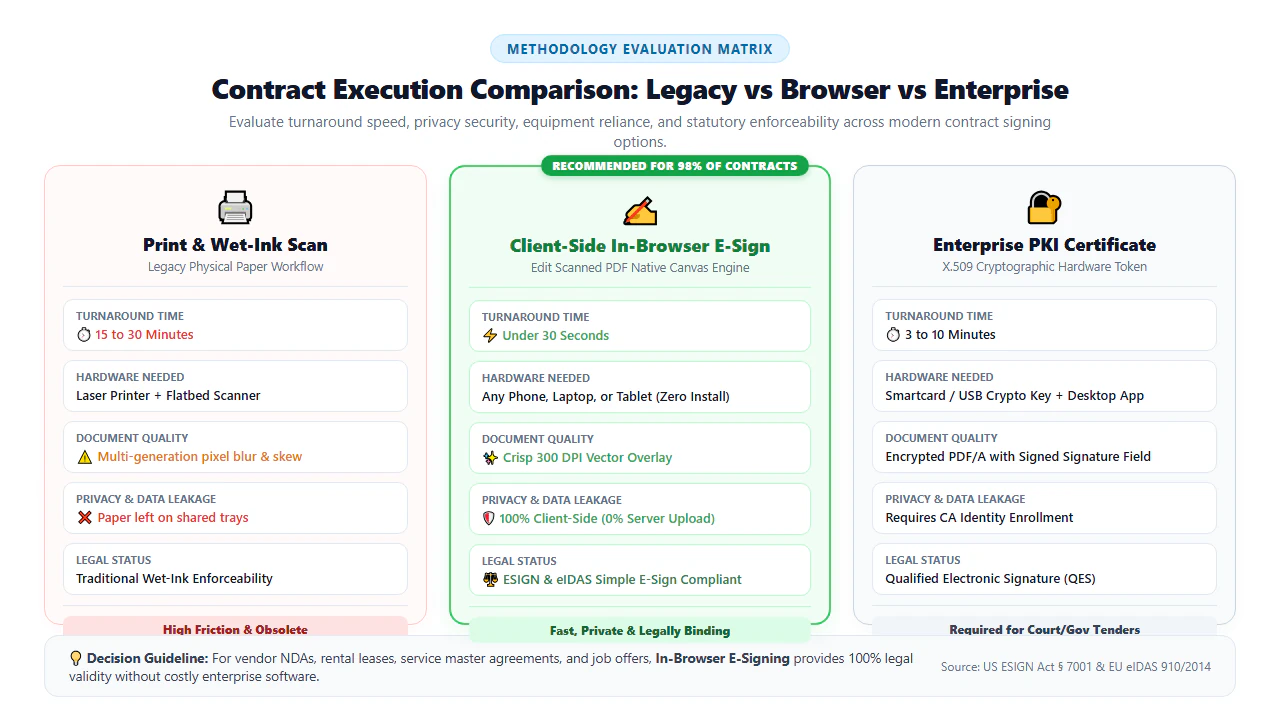
Signature Execution Matrix: Wet Ink vs. Cloud Portals vs. Client-Side eSign
Before executing important contracts, compare the trade-offs between manual wet-ink paper signing, costly cloud signature portals, and client-side browser e-signing:
| Operational Dimension | Traditional Physical Wet-Ink Signing | Commercial Cloud Signature Portals | EditScannedPDF In-Browser eSign |
|---|---|---|---|
| Execution Turnaround Time | Hours to Days (print, sign, scan, re-email) | Minutes (requires recipient account creation) | Under 30 Seconds (instant drag, drop, and sign) |
| Confidential Data Privacy | Physical paper exposure risk | ⚠️ High (contracts cached on third-party cloud servers) | ✅ 100% Private (local device WebAssembly memory) |
| Software Cost & Subscriptions | Printer ink, paper & scanner hardware costs | ⚠️ Expensive recurring enterprise subscriptions ($15-$40/mo) | ✅ 100% Free with zero registration or paywalls |
| Signature Anti-Theft Security | Original paper signatures can be scanned | Signature stored in cloud account profile | ✅ Destructive canvas raster flattening prevents extraction |
| Mobile Device Compatibility | ❌ Incompatible (requires physical printer/scanner) | Requires native mobile app or account login | ✅ Instant touch signing in Safari, Chrome & Firefox |
| Statutory Legal Validity | Universal Common Law Acceptance | ESIGN, UETA & eIDAS Compliant | ✅ 100% Compliant under ESIGN & UETA standards |
Recommended Companion PDF Tools for Contract Preparation
Executing an agreement often involves minor clerical adjustments, date stamping, or document merging. Pair our signing tool with these specialized browser-based utilities:
| Document Objective | Recommended Companion Tool | Key Technical Capability | Execution Privacy Mode |
|---|---|---|---|
| Affix Electronic Signature | Digital Signature PDF | Vector Bézier curve capture and destructive raster flattening | 100% Client-Side In-Memory Sandbox |
| Add Dates, Text & Initials | Add Text to PDF | Insert clean typographic labels, dates, and initials | Zero Cloud Uploads • Browser RAM |
| Erase or Redact Clauses | Erase & Highlight PDF | Bilinear inpainting to cleanly delete outdated paragraphs | Permanent Hardware Canvas Scrubbing |
| Stamp Exhibit Labels & Seals | Image & Stamp PDF | Affix official corporate seals, notary stamps, or logos | Direct In-Memory Alpha Channel Blending |
| Merge Signed Exhibits | Merge Scanned PDF | Combine signature pages, disclosure schedules, and addendums | Native PDF Object Tree Concatenation |
| Encrypt Executed Contract | Password Protect PDF | Apply military-grade AES-256 encryption with custom keys | Zero External Key Transit |
Deep Architecture: ESIGN Act, UETA, eIDAS & Forensic Audit Trails
Under modern global contract jurisprudence, electronic contract execution is governed by specific statutory frameworks that eliminate any preference for physical paper over electronic records:
- The United States ESIGN Act (15 U.S.C. § 7001): Enacted by the U.S. Congress in 2000, the Electronic Signatures in Global and National Commerce Act explicitly establishes that a contract or signature "may not be denied legal effect, validity, or enforceability solely because it is in electronic form."
- The Uniform Electronic Transactions Act (UETA): Adopted in 49 U.S. states, the District of Columbia, and the U.S. Virgin Islands, UETA provides that where a law requires a signature, an electronic signature satisfies the law.
- The European Union eIDAS Regulation (Regulation (EU) No 910/2014): Governs electronic identification and trust services across all 27 EU member states, recognizing standard electronic signatures (SES) as legally valid and admissible in judicial proceedings.
To establish full legal enforceability in the event of a contractual dispute, courts evaluate four primary evidentiary pillars:
- Intent to Sign: Just as with physical ink, the signer must demonstrate an affirmative intention to authenticate the document (satisfied by clicking "Stamp Signature" or drawing strokes).
- Consent to Do Business Electronically: Parties must agree to conduct the transaction via electronic means (evidenced by exchanging PDF agreements via email or web portals).
- Association of the Signature: The signature must be logically or physically affixed to the exact document (guaranteed by our raster flattening engine).
- Document Retention & Integrity: Both parties must be capable of accurately retaining and reproducing the completed record for future reference (FRE 901 and FRE 1003).
lightbulb Engineering Pro Tip: Transparent PNG Signatures & Dark Navy Ink Emulation
If you prefer using your actual physical handwriting, write your signature in bold black ink on a crisp sheet of white paper in good lighting, snap a photo, and save it as a transparent PNG. When using our draw tool, selecting dark navy blue (e.g., #002b49) rather than pure digital black (#000000) provides authentic visual contrast, allowing bank verification officers and opposing counsel to instantly distinguish your freshly applied signature from pre-printed black document lines.
gavel Statutory Legal Notice: Exceptions to Electronic Signing Mandates
While over 98% of business, commercial, employment, and real estate transactions are legally executed electronically under the ESIGN Act and UETA, specific statutory exclusions exist. By law, electronic signatures are generally not permitted for wills, codicils, and testamentary trusts; court orders, notices, or official court documents in certain jurisdictions; notices of cancellation of health or life insurance; notices of default, acceleration, repossession, or foreclosure on a primary residence; and hazardous material transportation manifests. Consult licensed legal counsel regarding jurisdiction-specific execution requirements.
- No Printer Required: Avoid printing and re-scanning contracts; sign directly in your browser with pixel-perfect resolution.
- 100% Legal Enforceability: Governed by the US ESIGN Act, state UETA statutes, and EU eIDAS regulations for full court validity.
- Destructive Canvas Flattening: Bakes your signature permanently into document pixels, preventing copying or graphic extraction.
- Total Privacy Protection: Processing executes locally via client-side WebAssembly with zero file uploads or cloud retention.
Signing scanned PDF contracts online eliminates the friction, paper waste, and visual distortion of the traditional print-and-scan cycle. By leveraging client-side WebAssembly, EditScannedPDF.com allows you to capture smooth vector signatures, affix dates and titles, and permanently flatten documents in your browser—delivering legally binding, courtroom-ready contracts with 100% data privacy.
Sign Your Scanned Contracts Securely Online
Execute leases, NDAs, and commercial agreements in under 30 seconds with complete client-side security. Zero software installation, zero accounts, and zero cloud uploads.
signature Sign Scanned Contract FreeFrequently Asked Questions on Contract Signing
Is an electronic signature added to a scanned PDF legally binding and enforceable in court?
Yes. Under the United States Federal ESIGN Act (15 U.S.C. § 7001), the Uniform Electronic Transactions Act (UETA), and EU eIDAS Regulation (Regulation No 910/2014), electronic signatures carry the same legal weight and enforceability as traditional physical pen-and-paper signatures on commercial contracts, non-disclosure agreements, leases, and business documents.
Do I need to print out a scanned contract to sign it with a physical pen?
No. Printing a scanned PDF just to sign it and scan it again wastes paper and ink while degrading document visual resolution. Using in-browser client-side signature tools allows you to draw or stamp an authentic vector signature directly onto the digital page, preserving pristine original quality.
Are my confidential contracts, NDAs, and financial terms uploaded to external servers when signing?
With EditScannedPDF.com, absolutely not. Document rendering, vector signature capture, and canvas raster flattening execute 100% inside your local web browser using WebAssembly. Your proprietary business terms, financial numbers, and client data never leave your local computer.
Can an unauthorized party copy, lift, or extract my signature image from the finalized PDF?
When you export using our Flatten option, your signature is permanently rasterized into the underlying document canvas. It is no longer a floating image or annotation object that can be clicked, separated, or extracted by unauthorized third parties.
What is the difference between an electronic signature (e-sign) and a cryptographic digital signature?
An electronic signature (e-sign) is any sound, symbol, or electronic process logically associated with a contract with an intent to sign (such as a drawn signature or stamped initials). A cryptographic digital signature relies on Public Key Infrastructure (PKI) with a cryptographic certificate issued by a Certificate Authority (CA) to mathematically seal the document.
How do I add dates, checkmarks, and my printed name alongside my electronic signature?
Our integrated browser editor includes precision text and annotation tools. After placing your signature, click the Add Text tool to type your printed name, title, organization, and current execution date in matching typography directly adjacent to the signature block.
Will electronically signing a scanned PDF degrade the document resolution or make text blurry?
No. EditScannedPDF.com maintains the original DPI and coordinate grid of the input scan. Vectors are rendered at high resolution, and the exported file preserves sharp, legible text and clear signature baselines without blurriness or downsampling.