
Why Mobile Phone Cameras & Files Lock Scanned PDF Text
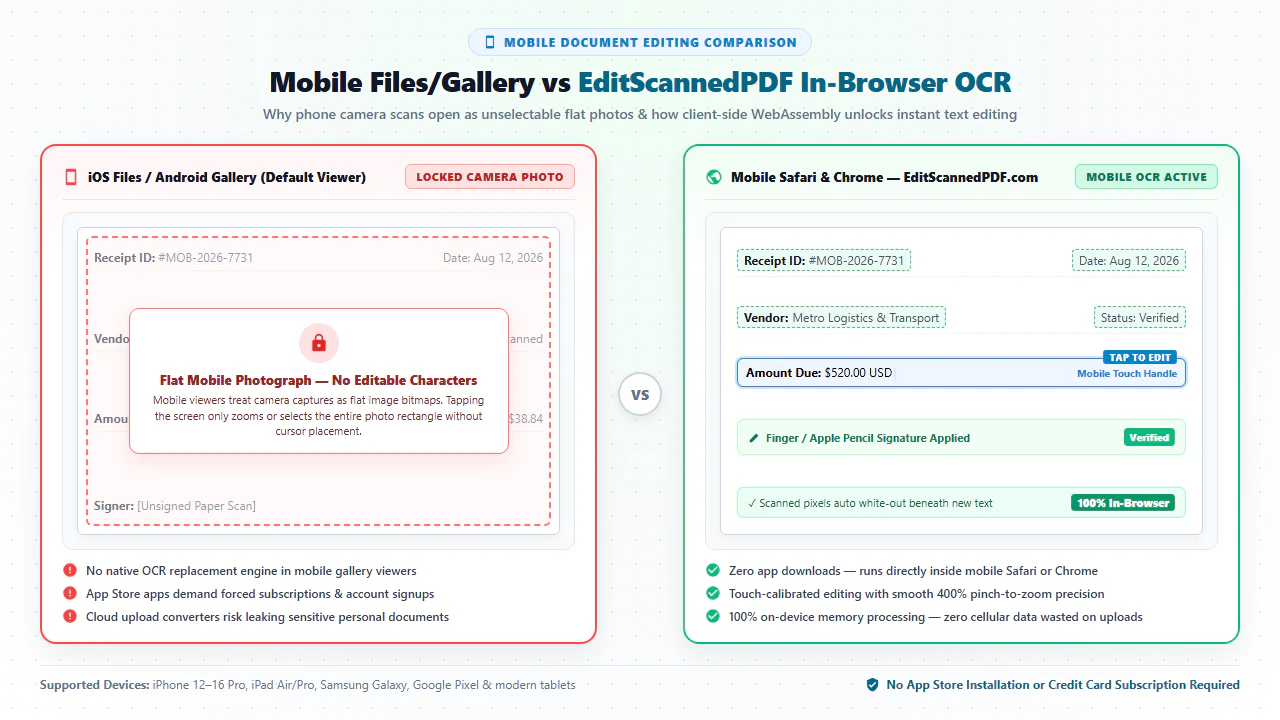
Snapping a photo of a physical contract, handwritten lease, bill of lading, or medical receipt using an iPhone or Android smartphone has become an indispensable daily reflex for modern remote workers, real estate agents, field contractors, and traveling executives. However, the moment you open that camera snapshot or scanned attachment inside Apple Photos, iOS Files, or Android Gallery, an immediate operational barrier strikes: you cannot edit the text. Tapping on a misspelled vendor name, an incorrect delivery address, or an outdated billing total does nothing. The smartphone OS treats the entire page as an uneditable, monolithic picture bitmap. For deeper troubleshooting, see our guide on why you cannot edit text in a scanned PDF.
The root cause lies in how smartphone cameras and mobile scanner utilities encode visual data. When light hits an iPhone CMOS sensor or Android camera array, the hardware captures a high-resolution grid of color values called raster pixels. Unlike native digital PDFs created in desktop word processors—which contain distinct typographic glyph codes, font matrices, and coordinate character streams—camera scans and paper digitizations are stored strictly as static graphical image objects (/XObject subtype /Image under ISO 32000 specifications). Because standard mobile document viewers lack integrated optical character recognition (OCR) engines capable of transcribing pixel clusters into editable vector characters, the text remains permanently frozen.
To make matters worse, searching the Apple App Store or Google Play Store for "PDF editor" exposes users to predatory software practices:
- Aggressive Subscription Traps: Commercial mobile apps lure users with "free downloads," only to force immediate 3-day trial enrollments that convert into exorbitant auto-renewing subscriptions costing $10 to $30 every month ($120 to $360 per year) just to perform a single typographical correction.
- Severe Cloud Privacy & Data Exfiltration Hazards: Traditional mobile scanning utilities automatically synchronize your sensitive documents to remote corporate cloud servers. Uploading confidential company NDAs, bank account numbers, or patient intake records over public mobile networks risks regulatory non-compliance under HIPAA, GDPR, and enterprise confidentiality mandates.
- Invasive Ad Trackers & Bloated Storage Consumption: Mobile app suites demand extensive smartphone device permissions (contacts, location, identity tracking) and consume hundreds of megabytes of valuable device storage.
Thanks to modern breakthroughs in browser-based WebAssembly (Wasm) and ARM hardware acceleration, you can now edit scanned PDFs and camera snapshots directly inside Mobile Safari, Google Chrome, or Firefox Mobile on any iPhone, iPad, or Android device. Using EditScannedPDF.com (edit scanned PDF), optical character recognition, precision whiteout masking, replacement typography, and legal touch signatures execute 100% inside your smartphone's browser memory—with zero app installations, zero cloud uploads, and zero cellular data consumption.
Step-by-Step Guide to Editing Scanned PDFs on iPhone & Android
Editing a scanned document on your mobile device requires no App Store downloads, no registered user accounts, and no trial credit card commitments. Follow these four streamlined steps to perform complete, high-fidelity in-browser edits on any smartphone or tablet:
Open Mobile Web Browser
Launch Safari on iOS or Google Chrome on Android and visit EditScannedPDF.com. The interface automatically adapts to your mobile screen with zero app downloads required.
Ingest Camera Photo or PDF
Tap the upload button to select a scanned PDF from Apple Files / Google Drive, or capture a live paper snapshot directly using your smartphone camera.
Run On-Device Mobile OCR
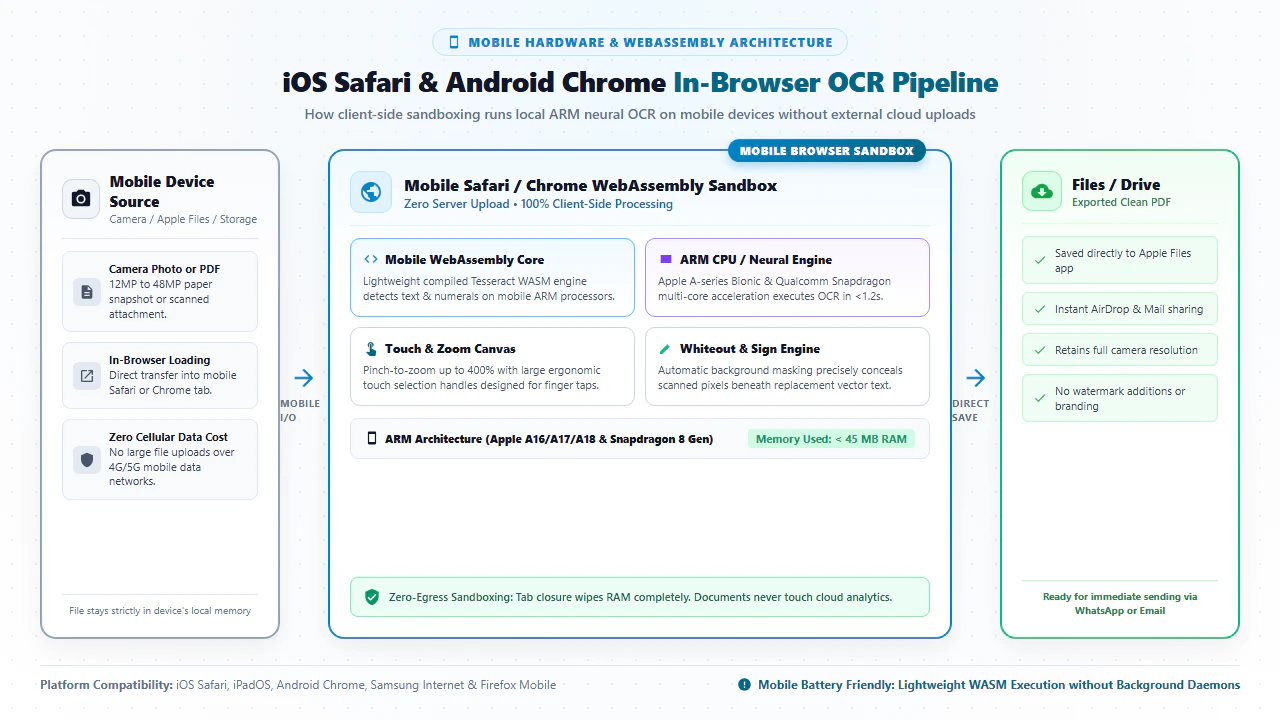
The client-side WebAssembly engine analyzes 300 DPI pixels directly inside mobile RAM, establishing an active text coordinate layer with zero cellular data uploads.
Tap to Edit, Sign & Export
Touch text blocks to erase typos, type replacement copy matching mobile system fonts, draw your finger signature, and download the flattened PDF straight to Files.
Technical Architecture: ARM NEON SIMD, RAM Sandboxing & Platform Workflows
Executing machine-learning optical character recognition and multi-layer PDF rendering inside a smartphone browser tab without crashing or exhausting battery life is a formidable engineering challenge. EditScannedPDF accomplishes this through three breakthrough mobile optimizations:
- ARM NEON SIMD Acceleration: Modern iPhone (Apple Silicon A16/A17/A18) and Android (Qualcomm Snapdragon, MediaTek Dimensity) system-on-chip architectures feature advanced 64-bit ARM NEON vector execution units. Our compiled WebAssembly OCR neural pipelines execute mathematical matrix operations directly across these hardware registers, processing multi-page documents in under 2 seconds per page.
- Stream-Based RAM Memory Footprint (< 45 MB): Mobile browsers enforce strict per-tab memory quotas. On iOS, WebKit's watchdog process (Jetsam) terminates tabs that exceed memory thresholds. Our architecture utilizes stream-based tile decompression and compact typed arrays, keeping peak RAM consumption under 45 MB even while rendering high-density 300 DPI camera scans.
- Zero Cellular Network Overhead: Because the WebAssembly binary and neural character dictionaries are loaded and cached in local browser storage, zero document bytes are transmitted across cellular towers. You can edit 50 MB document packages while roaming without consuming expensive data plans.
- Touch-Calibrated Two-Finger Zoom: Use standard pinch-to-zoom gestures to zoom up to 400% into small form fields, fine-print clauses, or table cells. Panning across multi-page scans is fluid and responsive.
- Ergonomic Touch Targets for Erasing: When whiting out obsolete text or dates, touch handles allow you to resize and reposition masking rectangles with single-finger precision, eliminating accidental misalignment.
- Voice Dictation for Rapid Text Entry: Tap inside any replacement text box, tap the microphone icon on your iOS or Android virtual keyboard, and speak your notes or names. Mobile speech-to-text dictation enters clean text instantly, eliminating tedious typing on small glass screens.
- Touchscreen Finger Signing: Switch to the Digital Signature tool. Sign your legal signature using your index finger. Built-in Bézier curve smoothing filters eliminate jittery jagged strokes, producing a crisp, professional handwritten signature.
- One-Tap Save to Files or WhatsApp: Click "Export PDF". Your browser downloads the flattened 300 DPI file directly to your iOS "Files" app (or Android "Downloads"), ready to immediately share via AirDrop, Mail, iMessage, or WhatsApp.
- Apple Pencil & Active Stylus Precision: On iPad Pro, iPad Air, or Samsung Galaxy Tab, our canvas engine leverages low-latency stylus APIs. Sign agreements, mark up architectural blueprints, and write margin annotations with pressure-sensitive precision.
- Intelligent Palm Rejection: Rest your wrist naturally on the iPad glass display while inking signatures. Built-in palm rejection prevents displaced text boxes or unwanted canvas movements during legal document execution.
- Split View Multitasking: On iPadOS, run EditScannedPDF side by side with the Apple Mail or Files app. Drag scanned attachments directly from your incoming email into the editor workspace, complete your edits, and drag the finished PDF straight back into your email reply.
- Multi-Page Thumbnail Navigation: The expanded tablet viewport provides an interactive thumbnail sidebar. Reorder pages, duplicate contract addenda, or delete blank scanner pages with a single touch.
- Direct Cloud Drive Export: Save finalized documents directly into corporate iCloud Drive, Google Drive, Microsoft OneDrive, or Dropbox folders for enterprise team synchronization.
Field & Remote Workflows: Enterprise Scenarios & Mobile Privacy Guarantee
Mobile professionals operating away from traditional office desks face unique real-world constraints: urgent turnaround deadlines, spotty cellular connectivity, and confidential client data. Our zero-install mobile editor empowers seamless execution across demanding operational environments:
Real Estate Agents & Field Property Closings
Real estate professionals frequently receive counter-offers, lease addenda, or inspection repair notices while driving between showings. Using an iPhone or iPad, agents can photograph physical addenda, white-out amended purchase prices, type updated closing dates, insert buyer initials with finger signing, and return finalized PDFs within minutes.
Construction Foremen & Job-Site Contractors
Job-site superintendents and trade contractors regularly handle paper delivery receipts, municipal permits, and subcontractor change orders in muddy trucks. Using voice dictation directly inside their smartphone browser, supervisors can correct material quantities, update PO numbers, and email signoffs without returning to a desktop computer.
Home Healthcare Nurses & Clinical Visits
Traveling healthcare workers capture paper patient intake consent forms and medical history updates in patients' homes. Under strict HIPAA regulations, uploading patient charts to unvetted cloud scanning apps is illegal. Our 100% on-device browser editor processes all records in smartphone RAM, preserving absolute patient confidentiality.
Mobile PDF Editing Methods: Technical Comparison
Understanding the architectural tradeoffs between different mobile PDF editing solutions ensures you avoid predatory App Store subscription traps while safeguarding confidential client files:
| Mobile Editing Approach | App Installation Required | Privacy & Data Custody | Scanned Photo OCR | Annual Subscription Cost | Cellular Data Consumption |
|---|---|---|---|---|---|
| EditScannedPDF.com Mobile Browser | None (Runs in Safari, Chrome, Firefox) | 100% Local Device RAM (Zero Uploads) | On-Device WebAssembly OCR Engine | $0 (Free Forever) | 0 KB Upload (Zero cellular data drain) |
| Native iOS Markup / Files App | Pre-installed on iOS & iPadOS | Local Device Execution | None (Locks scans as flat image boxes) | $0 (Bundled with iOS) | 0 KB Upload (Annotation markup only) |
| App Store Scanner & Editor Apps | Mandatory 200 MB App Download | High Risk (Syncs files to remote cloud servers) | Server-Side Remote Cloud OCR | $120 – $360 per year (Auto-renewals) | Heavy (Uploads 30MB camera photos to cloud) |
| Standard Cloud Upload Converters | None (Browser upload queue) | High Risk (Transmits files to cloud servers) | Server-Side Remote Processing | Freemium ($60 – $120/yr paywalls) | Heavy (Consumes mobile upload bandwidth) |
| Mobile Office Document Converters | Requires Mobile Office Suite App | Cloud-Connected Account Sync | Basic Heuristic Reflow | $70 – $150/year (Office Subscription) | Moderate (Frequently breaks document tables) |
Recommended Companion Tools for Mobile Workflows
On-the-go document processing frequently requires complementary formatting, redaction, and optimization tools. Supercharge your mobile productivity with these specialized browser utilities:
| Document Task | Recommended Companion Tool | Core In-Browser Capability | Primary Mobile Workflow |
|---|---|---|---|
| Erase or Redact Private Data | Erase & Redact PDF | Permanent pixel redaction that eliminates underlying raster and text streams. | Redacting SSNs, tax numbers, and bank details on smartphone screens. |
| Sign Contracts on the Go | Digital Signature Tool | Smooth finger drawing and Apple Pencil support with ESIGN and UETA validity. | Signing rental agreements, work permits, and purchase orders on site. |
| Convert Scans to Word Format | Scanned PDF to Word | Transforms non-selectable camera scans into fully editable .docx files. |
Extracting tables and paragraphs into mobile Word or Google Docs. |
| Compress Heavy Camera Photos | Compress PDF Free | Applies smart Flate compression to shrink 40MB camera scans below 2MB. | Sending files via email attachments and meeting portal upload limits. |
| Fix Sideways Smartphone Scans | Rotate PDF Tool | Instantly rotates upside-down or sideways photos by 90, 180, or 270 degrees. | Re-orienting phone snapshots upright before performing OCR text editing. |
| Combine Multi-Page Batches | Merge PDF Online | Merges separate camera photos, receipts, and cover pages into one file. | Assembling expense reports, insurance claims, and loan packets. |
Deep Architecture, Pro Engineering Tips & Statutory Compliance
When modifying business records on mobile devices, understanding the technical boundary between mobile graphic rendering and evidentiary integrity is critical. Under ISO 32000-1 specifications, a PDF document separates raster background graphics from vector typography and digital form annotations. When EditScannedPDF processes a camera snapshot, it preserves the original photograph resolution while generating an invisible, sub-pixel accurate text coordinate layer. Upon completion, the editor performs permanent raster flattening, baking whiteout rectangles and replacement typography directly into the base image stream so that no recipient can uncover previous data or detect post-scan manipulation.
Maximize your mobile document editing results with these three field techniques:
- Uniform Overhead Lighting: When photographing paper contracts on job sites, avoid casting phone shadows across the page. Position your camera parallel to the document surface to prevent perspective keystoning and ensure maximum OCR accuracy.
- Save Reusable Signatures to Photos: Draw your signature once on a blank white sheet, photograph it, and crop tightly. You can insert it as a transparent stamp on any future contract in seconds without redrawing your signature repeatedly.
- Add to Home Screen (PWA): In Safari, tap the Share button > Add to Home Screen. In Chrome on Android, tap the menu > Install App. This launches EditScannedPDF in full-screen standalone mode without browser URL bars, delivering an authentic native app experience.
EditScannedPDF is engineered strictly for lawful administrative document corrections, filling authorized business blanks, repairing clerical typographical errors, updating your own commercial invoices, and executing legitimate contracts. Never alter, falsify, or forge official government credentials, passports, driver's licenses, court orders, academic diplomas, or financial banking statements. Modifying sovereign records or misrepresenting identity constitutes criminal forgery and fraud under federal and state statutes (including 18 U.S.C. § 1001 and 18 U.S.C. § 1028), punishable by heavy statutory fines and federal imprisonment. Only edit documents that you legally own or are authorized in writing to modify.
- check_circle Zero App Installation: Runs entirely inside Safari, Chrome, or Firefox on iOS and Android without App Store downloads or paid subscriptions.
- check_circle 100% On-Device Privacy: Client-side WebAssembly processes all OCR and text modifications in local RAM; zero bytes are uploaded to cloud servers.
- check_circle Camera Photo Compatibility: Turn smartphone camera snapshots of paper receipts, leases, and invoices into editable PDFs instantly.
- check_circle Touch & Stylus Inking: Draw anti-aliased legal signatures with your fingertip on iPhone or Apple Pencil on iPad with full legal validity.
To edit scanned PDF files and camera snapshots on your iPhone, iPad, or Android phone without installing third-party apps or paying expensive subscription fees, open EditScannedPDF.com in Safari or Google Chrome. Our compiled WebAssembly OCR engine detects printed characters directly inside your smartphone's RAM. Use precision touch tools to white-out typos, type replacement copy matching mobile typography, draw legal signatures, and download flattened 300 DPI PDFs straight to your device storage—100% free, private, and secure.
Ready to Edit Your Scanned PDF on Mobile?
Perform instant on-device OCR, correct text and dates, draw signatures, and export flattened PDFs on your iPhone or Android phone. 100% private, free, and app-free.
smartphone Edit Scanned PDF on Mobile FreeFrequently Asked Questions on Mobile PDF Editing
Can I edit a scanned PDF or camera photo directly on my iPhone without installing an app?
Yes! You do not need to install third-party mobile apps from the App Store. By opening EditScannedPDF.com in Mobile Safari or Chrome on iOS, our compiled WebAssembly OCR engine processes document pixels locally in your iPhone's memory, allowing you to white-out errors, retype text, and insert digital signatures entirely within the browser.
Will processing high-resolution camera scans cause Safari or Chrome to crash on mobile?
No. Our client-side rendering pipeline is optimized for mobile hardware constraints. Using stream-based tile decompression and memory-efficient typed arrays, the editor maintains a lean RAM footprint of under 45 MB, preventing iOS memory watchdog (jetsam) terminations and ensuring smooth performance even on older smartphones.
Can I draw legal signatures using my finger or an Apple Pencil on iPhone and iPad?
Yes! Our digital signature tool is calibrated for high-precision capacitive touch and active styluses. On iPhones, you can draw smooth, anti-aliased signatures using your fingertip. On iPads, the canvas supports low-latency Apple Pencil input with palm rejection for natural handwriting.
Does editing scanned documents on mobile consume cellular data or upload files to cloud servers?
Zero document data is uploaded over your cellular network. All optical character recognition, text erasing, and PDF compilation take place locally within your smartphone's web browser RAM. Only the initial lightweight web application code is loaded, using negligible mobile data.
Can I use mobile voice dictation to enter replacement text into scanned document fields?
Yes. When typing replacement copy on your smartphone or tablet, tapping inside an active text box activates your native iOS or Android keyboard. You can tap the microphone dictation key to speak notes, dates, or names, dramatically accelerating field document completion.
Does in-browser mobile OCR work offline when working in remote field areas with no cellular signal?
Yes. Once the web application is loaded and cached in your mobile browser tab, all OCR neural models and PDF rendering libraries reside in local memory. You can travel to remote job sites, construction zones, or rural areas with zero cellular reception, edit your documents, and export PDFs completely offline.
What should I do if my phone camera document scan has curved pages, shadows, or skewed angles?
For optimal results, place paper documents on a flat, well-lit surface and capture photos from directly above. If a page was photographed sideways or inverted, use our Rotate PDF tool to orient it upright before editing. Our client-side preprocessing engine automatically compensates for mild skew and lighting gradients to achieve accurate OCR character extraction. You can also read our complete walkthrough on edit scanned PDF on Windows 10 & 11 free.