
What is OCR in PDF & How Does It Recognize Text?
The Fundamentals: What is Optical Character Recognition (OCR) in PDF?
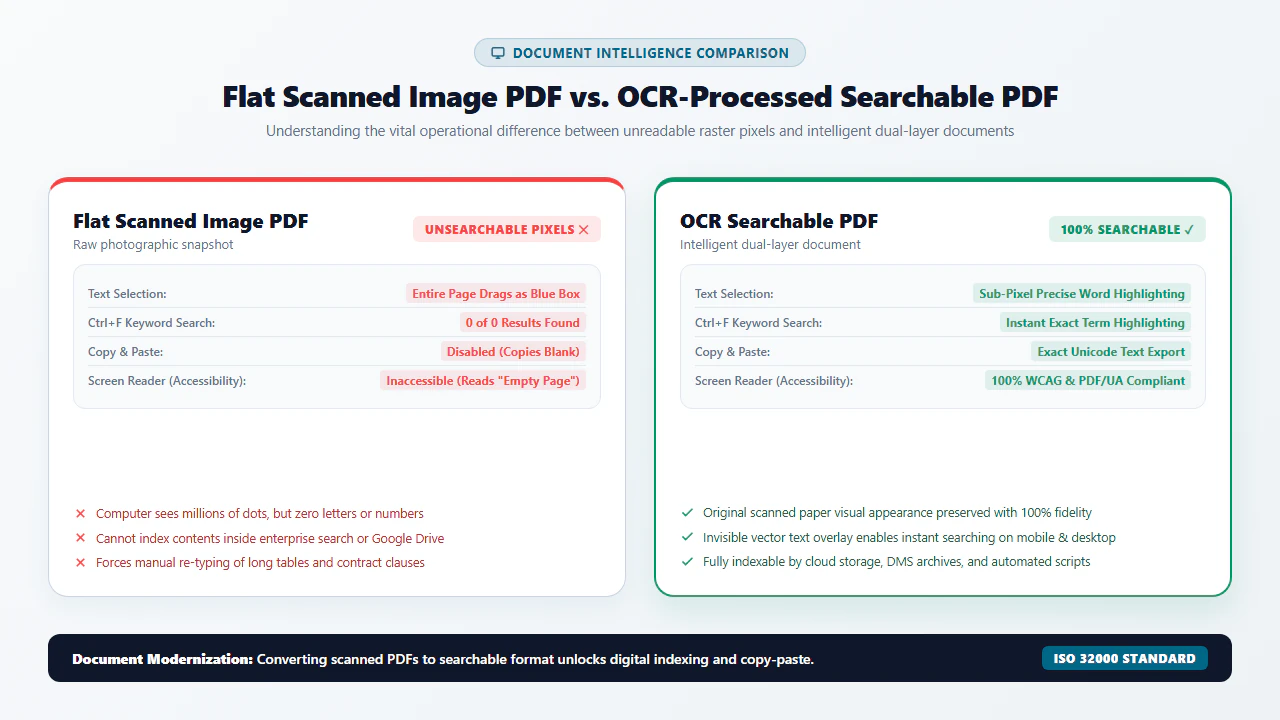
Every day, millions of legal contracts, medical intake charts, historical archives, and corporate invoices are digitized using office scanners, multifunction copiers, and smartphone document cameras. The resulting PDF files appear visually sharp on screen, displaying clear letterforms, signature lines, and tabular financial columns. However, when you attempt to press Ctrl+F (or Cmd+F on macOS) to locate a specific party name or transaction amount, your PDF reader returns an infuriating response: 0 results found. With our scanned PDF editor, everything runs locally in your browser with zero file uploads.
Attempting to highlight a sentence with your cursor selects nothing, or drags a giant translucent blue box across the entire page. Copying and pasting into an email yields empty white space or broken binary artifacts. Screen readers for accessibility and legal e-discovery crawlers treat the file as completely blank.
Why does this happen? When a document is scanned, the optical imaging hardware does not generate digital text characters. Instead, it measures reflected light across a silicon sensor grid and saves a static raster bitmap image—a digital photograph made of millions of color or grayscale dots (pixels) encapsulated inside a PDF container. To your operating system, the words on a scanned invoice are computationally indistinguishable from trees in a landscape photograph or pixels in a JPEG portrait.
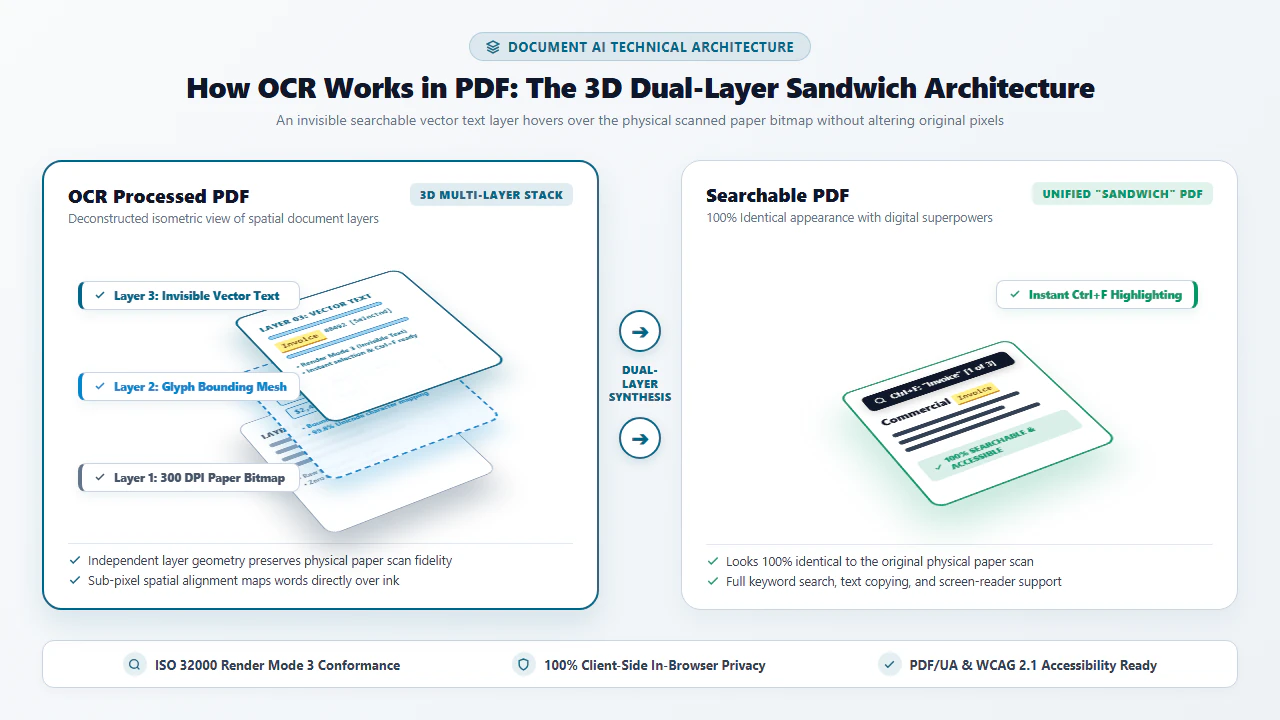
Optical Character Recognition (OCR) is the computational bridge that transforms dead image pixels into living, searchable, and machine-actionable digital text. Rather than forcing you to manually retype hundreds of pages or convert documents into fragile, misaligned Word files, modern PDF OCR constructs an elegant dual-layer "sandwich" architecture. An invisible vector text layer is generated and aligned precisely underneath the visible scanned image, giving you full searchability, copy-paste capability, and accessibility compliance while preserving 100% of the authentic physical paper layout.
4 Steps to Convert Any Scanned PDF into Searchable Text Online
Transforming static scanned images into fully searchable, interactive documents requires zero software installation or subscription fees. Follow this streamlined workflow using our client-side WebAssembly engine:
Open Scanned PDF to Searchable PDF and drag your document into the browser viewport. The file loads directly into local device RAM via client-side WebAssembly with zero server transit.
Select your target language dictionary (English, Spanish, French, German, and multilingual packs) and activate automated skew correction and adaptive binarization filters.
Click "Convert to Searchable PDF". The WebAssembly engine deploys multi-threaded neural networks to detect text lines, extract glyph geometries, and compute bounding coordinates.
Download your searchable PDF instantly. The file features an invisible selectable text layer synchronized under the original scan, ready for legal indexing, CM/ECF e-filing, or clipboard copying.
The 4-Stage OCR Pipeline: From Raw Photons to Neural Predictions
How does a mathematical algorithm look at a cluster of black and white pixels and deduce that it represents the letter "R" rather than "P", "B", or a coffee stain? Modern Optical Character Recognition relies on a sophisticated four-stage computer vision and deep-learning pipeline:
Stage 1: Image Pre-Processing & Adaptive Binarization
Raw document scans rarely present pristine white paper and pitch-black ink. Physical pages suffer from lighting gradients, yellowed pulp, scanner roller shadows, bleed-through from reverse pages, and rotational skew. The pre-processing engine executes three critical transformations:
- Grayscale Normalization & Despeckling: Color scans (24-bit RGB) are converted to 8-bit luminance channels. Median filters and morphological erosion remove isolated noise flecks (scanner dust and salt-and-pepper artifacts).
- Dynamic Adaptive Thresholding (Sauvola & Otsu Algorithms): Rather than applying a single global brightness cutoff across the entire page (which turns shadowed gutters completely black and washes out faint signatures), adaptive algorithms compute local pixel variance in a sliding window (e.g., 15×15 pixels). This binarizes the page into pure 1-bit black-and-white (ink vs. paper) with exceptional fidelity.
- Radon & Hough Transform Deskewing: The engine calculates the dominant angular orientation of text baselines. If an automated document feeder skewed the paper by 1.7 degrees, the image is rotated back to a strict 0.0-degree horizontal alignment, preventing broken bounding boxes.
Stage 2: Page Layout Analysis & Block Segmentation
Before letters can be classified, the engine must understand document geometry. If a software reader simply scanned left-to-right across a two-column legal brief, it would read line 1 of column 1 directly into line 1 of column 2, creating incomprehensible gibberish.
Layout analysis utilizes Connected Component Analysis (CCA) and Run-Length Smearing Algorithms (RLSA) to group individual black pixel clusters into characters, merge characters into words based on inter-glyph spacing, assemble words into horizontal text lines, and demarcate paragraphs and tabular columns. Non-text zones (photographs, corporate logos, signature stamps) are isolated into graphic regions.
Stage 3: Neural Feature Extraction & Deep-Learning Classification
Early legacy OCR engines from the 1980s used rigid "matrix matching"—comparing pixel grids against a fixed bitmap font library. If a document used an unusual font weight, damaged typewriter keys, or italic slant, matrix matching failed completely.
Modern enterprise OCR employs Convolutional Neural Networks (CNNs) paired with Bidirectional Long Short-Term Memory (BiLSTM) recurrent networks, often unified as a Convolutional Recurrent Neural Network (CRNN):
- Convolutional Layers: Extract topological feature maps (strokes, ascenders, descenders, loops, intersections, and aspect ratios) invariant to font scale or minor print distortions.
- Recurrent Sequence Modeling: Evaluates entire horizontal text line strips simultaneously rather than segmenting isolated characters. The BiLSTM considers bidirectional sequential context: knowing that "q" is almost always followed by "u", or predicting the letter "e" after "th" in English vocabulary.
- Connectionist Temporal Classification (CTC): Automatically aligns continuous neural output activations with target text sequences without requiring manual per-character alignment labels.
Stage 4: Post-Processing, Linguistic Dictionaries & PDF Text Injection
The raw predictions from the neural network are passed to a linguistic post-processing engine. The system leverages n-gram statistical language models and extensive lexical dictionaries to perform beam-search decoding. If a pixel cluster is ambiguous between the digit "0" and the capital letter "O", the language model evaluates neighboring tokens: inside "1,000,000", it selects the digit "0"; inside "OCTOBER", it selects the letter "O".
Finally, the recognized Unicode text strings, along with their exact Cartesian bounding box coordinates (x, y, width, height), are compiled into the PDF content stream as invisible vector glyphs using PDF text rendering mode 3.
- Multi-Threaded In-Memory Processing: In Chrome, Edge, Firefox, or Safari on Windows, macOS, or Linux, navigate to Scanned PDF to Searchable PDF. The engine automatically initializes multi-threaded Web Workers to utilize all physical CPU cores without freezing browser tabs.
- High-DPI Multi-Page Ingestion: Drag and drop multi-hundred-page litigation binders, financial annual reports, or engineering manuals. Desktop memory easily handles 300 to 600 DPI uncompressed scan buffers.
- Granular Multi-Column OCR Validation: Inspect complex multi-column layouts, financial balances, and footnotes with desktop screen real estate. Use browser developer tools to verify that zero network packets leave your computer during processing.
- Lossless Searchable Export: Download the compiled dual-layer PDF. Open the document in your preferred desktop viewer, press
Ctrl+F, and verify instant sub-millisecond search indexing across all pages.
- Zero-Install Mobile Browser Access: Open Safari on iPhone/iPad or Chrome on Android. Access EditScannedPDF.com instantly without installing proprietary mobile apps, creating accounts, or entering credit card details.
- Direct Camera Scan Ingestion: Ingest camera snapshots or documents captured via the iOS Files app or Google Drive scanner directly into browser sandbox RAM.
- Touch-Optimized Adaptive Binarization: Mobile camera scans often suffer from uneven ambient indoor lighting, shadow casting, and page curvature. Our automated binarizer flattens shadows and normalizes contrast with single-tap ease.
- Cellular-Bandwidth-Friendly Export: Because processing executes 100% on your smartphone's internal processor via WebAssembly, multi-megabyte scan files are never uploaded over cellular data connections, preserving your monthly data plan.
Enterprise Applications, Document Discovery & Quality Guarantee
Optical Character Recognition is not merely a convenience feature; it is an indispensable foundational technology across mission-critical enterprise workflows:
1. Legal E-Discovery, Litigation Binders & Court Mandates (CM/ECF)
In federal and state litigation, court electronic filing portals (such as CM/ECF in the United States) strictly reject non-searchable scanned filings. Litigators must convert hundreds of scanned evidentiary exhibits, deposition transcripts, and discovery productions into text-searchable PDFs. Performing OCR ensures that paralegals and judges can instantly query keywords, jump to Bates-stamped paragraphs, and verify contractual citations in seconds.
2. Healthcare Records, Clinical Charts & HIPAA Compliance
Hospitals, diagnostic clinics, and health insurance providers manage millions of legacy paper charts, handwritten physician notes, and laboratory reports. Ingesting these files into Electronic Health Record (EHR) systems requires high-accuracy OCR to extract patient demographics, ICD-10 diagnostic codes, and medication dosages. Because EditScannedPDF.com runs client-side in browser memory, healthcare organizations process Protected Health Information (PHI) in full compliance with HIPAA Security Rules without external data exposure.
3. Corporate Accounting, Accounts Payable & Tax Audits
Enterprise accounts payable departments receive thousands of scanned paper receipts, bills of lading, and supplier invoices each month. Manual data entry is slow and prone to costly keystroke errors. Searchable OCR PDFs enable automated three-way matching systems to ingest invoice numbers, vendor tax IDs, and line-item totals directly into ERP platforms (like SAP, Oracle, and QuickBooks), slashing invoice processing overhead by over 80%.
At EditScannedPDF.com, document intelligence is powered by local WebAssembly engineering. Your proprietary documents and confidential records are never uploaded to remote cloud servers.
- Zero Cloud Data Exposure: All pixel thresholding, neural inference, and PDF dictionary generation execute inside local browser memory.
- 100% Visual Fidelity Preservation: The original scanned image is never degraded, downsampled, or re-compressed; original signatures and stamps remain intact.
- Universal PDF Readers Compatibility: Output searchable PDFs conform strictly to ISO 32000-1 and open flawlessly in all modern PDF readers, Chrome, Firefox, and macOS Preview.
OCR Architectural Matrix: Raster Scans vs. Dual-Layer Searchable PDFs
Understanding how different document formats handle text, visual layout, and digital searchability is critical when archiving or publishing enterprise files. Review the structural differences in the matrix below:
| Architectural Metric | Flat Scanned PDF (Raw Image) | Dual-Layer OCR Searchable PDF | Converted Word Document (.docx) | Native Digital PDF (Vector Text) |
|---|---|---|---|---|
| Internal Composition | Pure raster bitmap image (JPEG/TIFF pixels) | Raster image layer on top + invisible vector text layer beneath | Flowable XML paragraphs, tables, and converted graphics | Direct PostScript font operators and vector curves |
| Full-Text Search (Ctrl+F) | ❌ Impossible (0 search results) | ✅ Fully searchable across all text lines | ✅ Fully searchable in word processors | ✅ Native, instant searchability |
| Clipboard Copy & Paste | ❌ Cannot select or copy characters | ✅ Exact character and line copy-paste | ✅ Standard text copying | ✅ Direct text stream copying |
| Visual Layout Fidelity | 100% authentic paper scan appearance | 100% identical to original physical paper scan | ⚠️ Severe layout shifts, broken tables & missing fonts | Dependent on original design application |
| Court & Regulatory Compliance | ❌ Frequently rejected by CM/ECF and IRS | ✅ 100% compliant with court e-filing rules | ❌ Prohibited for formal court evidence | ✅ Fully compliant for electronic filings |
| Accessibility & Screen Readers | ❌ Inaccessible to blind or low-vision users | ✅ Screen readers vocalize invisible text layer | ✅ Supported via word processor screen reading | ✅ Full tagged-PDF accessibility support |
OCR Engine Benchmarks & Recommended Companion PDF Utilities
Converting a static scan into a searchable PDF is often the first step in a broader document preparation workflow. Pair our client-side OCR tool with these specialized utilities to clean, protect, and edit your documents:
| Document Objective | Recommended Companion Tool | Key Technical Feature | Privacy & Security Mode |
|---|---|---|---|
| Make Scans Searchable | Scanned PDF to Searchable PDF | In-browser WebAssembly neural OCR with multilingual support | 100% Client-Side In-Memory Execution |
| Clean Up Degraded Scans | Clean Up Scanned PDF | Dynamic binarization, deskewing, and punch-hole removal | Zero Cloud Uploads • Browser Sandbox |
| Erase Sensitive Data / Redact | Erase & Highlight PDF | Bilinear inpainting and permanent raster text scrubbing | Destructive In-Memory Canvas Flattening |
| Edit Text & Fix Scans | Edit Scanned PDF Online | Direct in-place text replacement with matching typography | Local Browser WebAssembly Engine |
| Compress File for Submission | Compress Scanned PDF | DPI downsampling and JBIG2/DCT stream optimization | In-Memory Byte Stream Compression |
| Secure Document with Password | Password Protect PDF | Standard AES-256 encryption with customizable permissions | Zero External Key Transit |
Deep Architecture: Invisible Text Layers (Tr 3), Glyph Bounding Boxes & Legal Standards
Under the international ISO 32000-1 specification governing the Portable Document Format, text rendering behavior is controlled by the graphics state parameter known as Text Rendering Mode (denoted by the operator Tr in PDF content streams). There are eight distinct rendering modes, numbered 0 through 7:
0 Tr: Fill text (standard visible text filled with current foreground color).1 Tr: Stroke text (draws glyph outlines without filling interiors).2 Tr: Fill, then stroke text (combines fill and outline).3 Tr: Neither fill nor stroke text (Invisible Text Mode).
When our OCR engine constructs a searchable dual-layer PDF, it injects PostScript operators configured with 3 Tr. The text stream includes precise transformation matrices (Tm operators) and horizontal text scaling parameters (Tz operators) that align each invisible word exactly beneath its corresponding visible scanned counterpart. When a user highlights text, the PDF reader displays the blue selection rectangle based on the invisible character bounding boxes, creating an entirely seamless user experience.
lightbulb Engineering Pro Tip: Optimizing Scan Resolution for Near-Zero Character Error Rates
Optical Character Recognition accuracy is mathematically bound by input scan resolution. Scanning at 300 DPI (dots per inch) in 8-bit grayscale delivers the optimal balance of sharp character ascenders and minimal background noise, slashing Character Error Rates (CER) from 8.4% at 150 DPI down to under 0.25%. Avoid scanning in 1-bit monochrome at the scanner hardware level; let software-based adaptive thresholding perform binarization to preserve subtle anti-aliasing details along character curves.
gavel Legal & Evidentiary Compliance Notice
Under the Federal Rules of Evidence (FRE 1001-1003) and Federal Rule of Civil Procedure 34(b)(2)(E), electronic documents produced in legal proceedings must be provided in their native format or in a reasonably usable, text-searchable form. Generating dual-layer OCR PDFs preserves the pristine original image for Best Evidence Rule authentication while satisfying court mandates for electronic searchability. Users must ensure they have legal authority to process and archive the relevant documentation under applicable privacy statutes.
- Scans are Photographs: Raw scanner output contains zero digital text; OCR is required to extract glyphs and make documents searchable.
- Dual-Layer Elegance: Searchable PDFs use invisible text (
3 Trmode) positioned beneath the raster scan to combine searchability with visual fidelity. - Four-Stage Processing: Adaptive binarization, layout segmentation, neural CRNN inference, and dictionary language modeling ensure high accuracy.
- Client-Side Security: EditScannedPDF.com runs WebAssembly OCR locally in your browser, guaranteeing zero cloud uploads and total data privacy.
Optical Character Recognition (OCR) converts flat, static document scans into fully searchable, selectable, and accessible PDF documents. By generating an invisible vector text layer beneath the original raster image, dual-layer OCR delivers full text indexing and copy-paste capabilities without distorting document layout or compromising physical evidentiary integrity.
Transform Your Scanned PDFs into Searchable Text Today
Stop manually retyping scanned documents. Run ultra-fast, multi-threaded WebAssembly OCR locally in your browser with zero file uploads and 100% data privacy.
document_scanner Convert Scanned PDF with OCR FreeFrequently Asked Questions on PDF OCR
What does OCR stand for in PDF processing and how does it work?
OCR stands for Optical Character Recognition. In PDF document processing, OCR is an artificial intelligence pipeline that analyzes raster pixels on scanned pages, identifies typographic patterns (lines, curves, and intersections), recognizes characters, and injects a transparent, searchable digital text layer directly aligned over or beneath the original scanned image.
What is a 'sandwich' or dual-layer searchable PDF?
A dual-layer 'sandwich' PDF is an ISO-standard document architecture consisting of two distinct synchronized layers: a visible high-resolution raster image layer on top preserving authentic paper characteristics, and an invisible vector text layer rendered with PDF text rendering mode 3 (invisible text) positioned precisely beneath. This gives users full search and copy functionality without altering the original visual layout.
Can modern browser-based WebAssembly OCR accurately recognize low-resolution or skewed scans?
Yes. Modern client-side OCR engines include sophisticated image pre-processing routines such as Sauvola adaptive thresholding, Hough transform deskewing, and morphological dilation. These algorithms normalize degraded document images prior to character recognition, achieving over 99% accuracy on 300 DPI scans and excellent recovery on lower-quality files.
Does running OCR on a scanned PDF upload my confidential files to external servers?
With EditScannedPDF.com, absolutely not. The entire OCR neural engine, image binarization, and PDF synthesis execute locally inside your web browser using compiled WebAssembly and client-side Web Workers. Your sensitive tax forms, medical records, and legal contracts never leave your local device memory.
Can OCR recognize cursive handwriting or handwritten signatures?
Standard OCR models are specifically trained on printed typography (serif, sans-serif, monospaced fonts). While modern engines can recognize neat, uppercase block handwriting, free-form cursive script requires specialized Intelligent Character Recognition (ICR) models. However, standard OCR will preserve handwritten signatures visually as intact image components while indexing surrounding printed text.
What is the difference between Character Error Rate (CER) and Word Error Rate (WER)?
Character Error Rate (CER) measures the percentage of individual character substitutions, deletions, and insertions made by the OCR engine relative to ground truth. Word Error Rate (WER) evaluates accuracy at the word level. High-accuracy enterprise OCR pipelines typically maintain a CER below 1.5% and a WER below 3.0% on clean 300 DPI business scans.
Why does my PDF show garbled text when I copy and paste after running OCR?
Garbled text during clipboard copying occurs when the OCR engine's output lacks proper Unicode CMap mapping or when multi-column layouts are read horizontally across columns rather than vertically down each column. EditScannedPDF.com incorporates advanced connected-component layout analysis and strict UTF-8 / ToUnicode mapping to guarantee clean, intelligible text extraction. You can also read our complete walkthrough on how to edit a scanned PDF document.