
How to Find and Replace Text in a Scanned PDF Online Free (With Automatic OCR)
The OCR Architecture of Scanned PDF Search & Replace
Correcting a recurring typo, updating an outdated corporate entity name, or revising effective dates across a 30-page scanned legal agreement can consume hours of tedious clerical labor if attempted word by word. In modern word processors, pressing Ctrl + H replaces text across hundreds of paragraphs in milliseconds. However, when opening a scanned PDF in a standard document viewer, pressing Ctrl + F or Ctrl + H produces complete silence because traditional viewers treat scanned pages as flat, unsearchable photographs of paper. With our edit a scanned PDF, everything runs locally in your browser with zero file uploads.
For decades, users believed that purchasing an expensive commercial desktop PDF subscription ($200+/year) was the only mechanism to perform search-and-replace on scanned documents. Generic online converter utilities frequently fail completely because they lack integrated OCR character segmentation, or they force users to convert files into messy Word documents that destroy tabular alignment, distort signatures, and mangle font consistency.
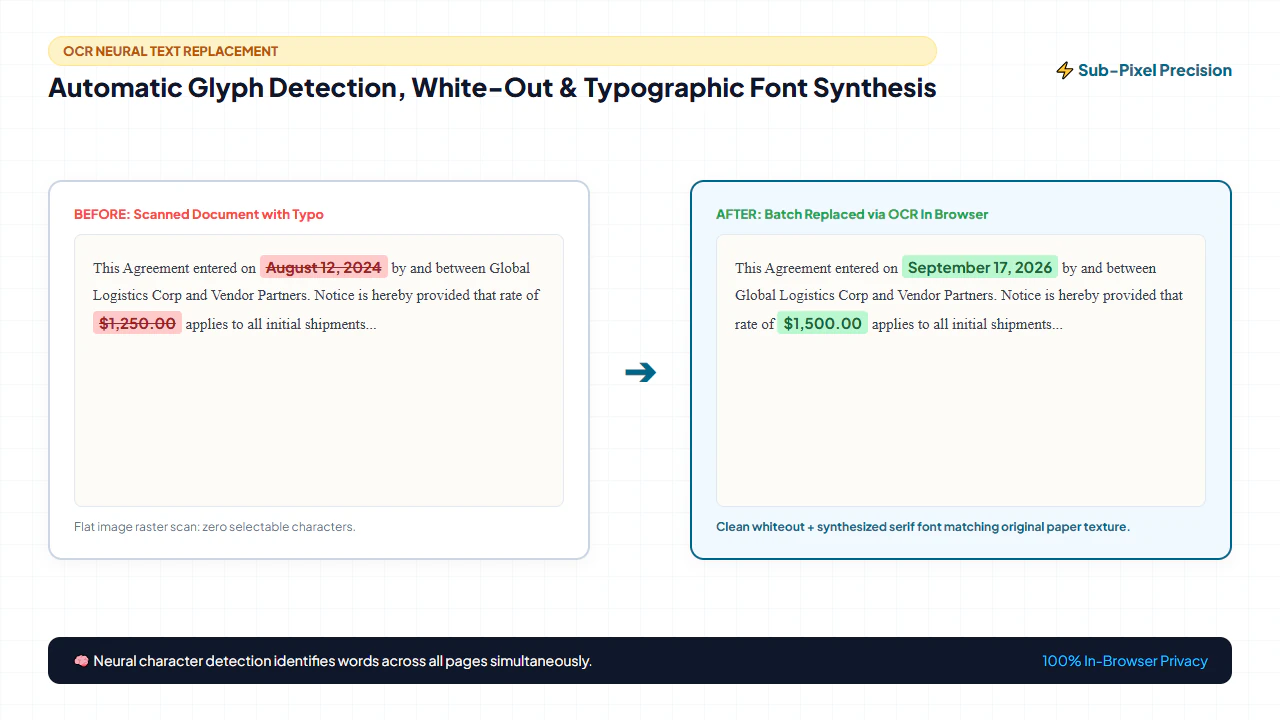
With modern client-side Optical Character Recognition executing directly in WebAssembly, you can now batch search and replace text across any scanned or image-based PDF directly in your web browser. Discover how automated glyph detection, precision ambient whiteout, and typographic font synthesis work together to replace scanned text with 100% privacy and zero server uploads:
1. Vector Content Streams vs. Scanned Raster Image Bitmaps
In digitally authored PDFs, text strings exist as explicit character byte streams mapped to embedded font tables. In scanned PDFs, each letterform is merely a group of colored pixels embedded within an uncompressed raster image matrix. Performing search and replace requires a multi-stage machine vision pipeline that first transcribes pixels into searchable coordinate geometries.
2. Neural OCR Glyphs & Character Bounding Box Detection
Our client-side WebAssembly OCR engine evaluates page pixel arrays to identify individual character contours, group them into words, and calculate normalized bounding box coordinates: [x_min, y_min, x_max, y_max]. When a user enters a search query, the engine matches string tokens directly against this spatial coordinate database.
3. Ambient Paper Tone Sampling & Localized Masking
Scanned paper is never sterile pure white (#FFFFFF); ambient lighting and scanner optics create subtle off-white tones (such as warm ivory or pale gray). When replacing text, the engine samples the authentic paper tone surrounding the target bounding box and applies an edge-feathered inpainting mask to cleanly erase original ink without leaving harsh rectangular seams.
4. Typographic Synthesis & Font Metric Calibration
Rather than slapping generic default fonts over erased text, the typographic synthesis engine measures original character height, baseline angle, stroke weight, and tracking. It renders replacement text using calibrated fonts that match the original scan's visual characteristics, ensuring the edited document looks authentic and unmanipulated.
4 Steps to Find & Replace Text in a Scanned PDF (Step-by-Step)
Batch replacing text across complex multi-page scans on EditScannedPDF.com requires no desktop software installations or expensive subscriptions. Follow this 4-step workflow to search and replace text with complete client-side security:
Ingest Scanned PDF Locally
Open the free Find & Replace PDF Tool. Drag your document directly into the browser viewport. The document is decoded in local browser RAM via WebAssembly without sending a single byte across the internet.
Execute Neural OCR Scan
Type your target search query into the search bar. The client-side OCR engine processes each raster page in milliseconds, constructing localized bounding box coordinates for every matching word.
Configure Replacement & Font
Enter your replacement string. The typographic engine automatically samples surrounding paper color and matches font family, weight, size, and line baseline orientation.
Batch Apply & Export PDF
Click "Replace Next" for selective review or "Replace All" for multi-page batch automation. The engine permanently overwrites bitmap pixels, updates the underlying text index, and exports an archival-grade PDF.
OCR Algorithmic Foundations & Platform Workflows
Replacing text inside a scanned image document is fundamentally an image processing and typographic reconstruction challenge. To achieve professional results that blend seamlessly into historical records, our browser-based engine combines three synchronized technologies:
- Spatial Bounding Box Mapping: The OCR engine constructs sub-pixel polygon coordinates for each word. When replacing words, the bounding box determines the exact rectangular region to be cleared and repainted.
- Adaptive Ambient Inpainting: Rather than applying sterile white rectangles, the engine calculates the local background color histogram from pixels immediately outside the bounding box, neutralizing paper texture mismatches.
- Dynamic Typographic Synthesis: The replacement text is rendered using SVG and Canvas typographic engines that match original stroke weight, font family (Times, Helvetica, Courier), size, and letter tracking.
- High-Resolution Browser Workspace & Document Load: Launch your desktop browser and drag your multi-page scanned PDF into the local editor. The WebAssembly engine decodes raster pages at full 300 DPI resolution, ensuring sharp character visualization.
- Live Keyword Search & Bounding Box Navigation: Press
Ctrl + For click the search bar to enter your target term. Matching instances across all pages are highlighted with colored overlay boxes. Use the Next/Previous buttons or keyboard shortcuts (Enter / Shift+Enter) to cycle through occurrences. - Font Matching & Ambient Tone Calibration: Enter the replacement word. The tool automatically analyzes the original font family, size, and line baseline angle. Preview the replacement directly on screen before finalizing to ensure visual harmony.
- Batch Execution & Instant WebAssembly Export: Click Replace Next to confirm individual changes or Replace All to update the entire document in one pass. Click Export PDF to compile the updated document directly to your hard drive with zero server latency.
- Mobile Document Ingestion & Camera Scan Import: Open Safari on iOS or Chrome on Android and tap Select Document. Import your scanned PDF or captured document photo directly from the Files app, iCloud Drive, or Google Drive.
- Touch-Friendly Search & Bounding Box Review: Tap the search input field on your mobile keyboard to enter your query. Detected words are displayed as tappable highlight chips. Pinch-to-zoom into specific clauses to inspect matching words with fingertip responsiveness.
- Fingertip Replacement & Typography Preview: Enter your new text in the replacement field. The mobile engine automatically scales font sizing to fit the original bounding box dimensions and blends surrounding paper tones.
- Instant In-Memory Mobile Download: Tap Replace All and then tap Download PDF. The updated file is compiled entirely within local device memory using 0MB of mobile data, saving directly into your phone's "Files" or "Downloads" folder.
Enterprise Use Cases & Privacy Guarantee
Automated text replacement across scanned documents eliminates massive administrative backlogs across legal, healthcare, real estate, and municipal sectors. Here is how organizations deploy client-side find-and-replace to streamline operations:
Scenario 1: Reusable Master Contracts, NDAs & Commercial Leases
Corporate procurement and legal teams frequently maintain standardized master agreements where original Word files have been lost or superseded. When onboarding new vendors or executing multi-party NDAs, paralegals use automated find-and-replace to update company legal names, registered business addresses, and effective execution dates across 40-page scanned documents in a single automated step.
Scenario 2: Legacy Catalogs, Price Lists & Technical Manuals
Manufacturing and retail enterprises possess extensive archives of legacy product catalogs, parts lists, and technical operating manuals stored as scanned PDFs. When product codes, currency symbols, or warranty terms change, automated batch replacement swaps outdated SKU numbers across hundreds of product tables without requiring expensive document re-typesetting.
Scenario 3: Legal Discovery, Case Dockets & Client Matter Numbers
Litigation support teams handling massive e-discovery productions frequently need to standardize internal docket tracking codes, correct misspelled party names in scanned deposition transcripts, or update counsel contact blocks across thousands of court exhibits before judicial filing.
100% Client-Side Privacy Guarantee: Zero Cloud Uploads
Your confidential legal exhibits, medical histories, and audited financial statements are never transmitted across the internet. EditScannedPDF.com executes all rendering, OCR bounding box detection, and typographic replacement algorithms entirely within your web browser's sandboxed WebAssembly execution environment. Files remain in local device memory, guaranteeing complete regulatory compliance with HIPAA, GDPR, GLBA, and attorney-client work-product confidentiality rules.
Comparison: In-Browser WebAssembly vs Expensive Software
Compare the operational advantages, privacy posture, and software costs of modern client-side WebAssembly replacement against costly desktop installations and generic cloud converters:
Quick Fix & Recommended Companion Tools
Choose the specialized browser tool below based on your exact document restructuring need and compliance requirement:
Deep Architecture, Typographic Synthesis & Legal Standards
Performing batch text updates across corporate, financial, and legal records requires rigorous technical execution and strict compliance discipline. In professional document workflows, document modifications must balance technical perfection with legal admissibility:
- Dual-Layer Synchronization: Modifying only the visual bitmap while leaving obsolete OCR text streams unaltered creates a dangerous 'ghost data' vulnerability where search engines index old terms. Our tool synchronizes both layers simultaneously.
- Baseline Angle Alignment: Scanned lines are rarely perfectly horizontal. The engine detects line slope angles (0.2° to 3.5°) and rotates replacement text vectors to match original typographical baselines.
- Paper Grain Texture Matching: By applying microscopic noise synthesis and edge feathering, newly inserted text blends naturally into 300 DPI scanned paper rather than appearing as a stark digital overlay.
verified Pro Engineering Tip: Dual-Layer Synchronization for Searchable Scans
When replacing text in a scanned PDF, altering only the visible raster image creates a synchronization discrepancy with the underlying OCR text index. Always use a tool that updates both the visible pixels and the invisible text stream simultaneously, ensuring that future search queries and automated data scrapers extract the newly replaced terms rather than outdated ghost data.
gavel Statutory Legal Compliance & Evidentiary Standard Notice: Legitimate Administrative Updates vs. Unlawful Document Manipulation
Permissible Document Administration: You may only perform text replacement on documents that you legally own, are officially authorized to administer, or are preparing under valid legal authority (such as template updates, typographical corrections on internal drafts, or client-authorized revisions).
Severe Criminal Penalties for Forgery & Spoliation: Digitally altering financial statements, bank records, tax returns, signed legal contracts, academic transcripts, or certified government exhibits for deceptive, fraudulent, or evidentiary tampering purposes constitutes serious criminal conduct under 18 U.S.C. § 1001 (Fraud and False Statements), 18 U.S.C. § 1519 (Destruction, Alteration, or Falsification of Records in Federal Investigations), and state forgery statutes, punishable by severe civil liability and imprisonment.
checklist Key Takeaways for Scanned PDF Search & Replace
- Integrated Client-Side OCR: Automatically detects character bounding boxes across raster image pages without external server processing.
- Adaptive Inpainting & Font Matching: Blends ambient paper tone and synthesizes original font metrics to eliminate visible editing artifacts.
- Synchronized Dual-Layer Updates: Permanently rewrites both the visual raster bitmap and the underlying searchable OCR text index.
- Complete Client-Side Privacy: Executes 100% inside your web browser's WebAssembly sandbox, ensuring total data privacy for HIPAA and GDPR compliance.
AI Overview Capsule: Find and Replace in Scanned PDF
To search and replace text across a scanned PDF document, load your file into the in-browser Find and Replace tool. The client-side OCR engine identifies character coordinates, clears target words with tone-matched inpainting, and types replacements with matching fonts and baseline angles. Export the updated PDF directly from local memory with 100% data confidentiality.
Find and Replace Text in Scanned PDFs with 100% Privacy
Batch replace words, names, dates, and numbers across multi-page scans with automated OCR font matching.
find_replace Start Finding & Replacing NowFrequently Asked Questions
Why can standard PDF viewers not find and replace text in scanned files?
Standard PDF viewers (like Chrome, Edge, and basic desktop readers) rely on underlying digital vector text streams to execute search-and-replace. Scanned PDFs are fundamentally flat raster photographs composed solely of colored pixels. Without an integrated Optical Character Recognition (OCR) neural engine to detect character shapes and map their geometric bounding box coordinates, standard readers cannot detect words.
Does this tool replace text across all pages at once?
Yes. Our client-side WebAssembly engine includes both 'Replace Next' (for selective manual verification) and 'Replace All' (for multi-page batch automation). When selecting Replace All, the OCR engine iterates across every page in local RAM, identifying all matching character bounding boxes and substituting replacement text simultaneously.
Will the replacement text match the original scanned font?
Yes. The typographic synthesis module measures original letterform height, baseline angle, stroke weight, and character pitch. It automatically selects the closest matching font family (e.g., standard serif, sans-serif, or monospaced typewriter), adjusts tracking, and samples surrounding paper texture so replacement text blends seamlessly into the document.
Is it safe to replace sensitive text in contracts and banking documents?
Completely safe. Unlike cloud-based document conversion websites that upload confidential files to external servers, EditScannedPDF.com runs 100% locally in your web browser. Your confidential contracts, financial statements, and medical records never leave your device memory, ensuring complete regulatory compliance with HIPAA, GDPR, and enterprise confidentiality rules.
How does the OCR engine handle imperfect or skewed scans?
The OCR pipeline incorporates pre-processing sub-routines that analyze mechanical feeder skew using Hough and Radon projection profiling. It calculates the baseline tilt angle and aligns character bounding boxes accordingly, ensuring that replacement text aligns flush with original crooked or angled lines.
Does replacing text also update the underlying searchable OCR layer?
Yes. When you execute a find-and-replace operation on EditScannedPDF.com, the engine synchronizes both layers: it visually updates the raster canvas pixels with matching typography and simultaneously updates the hidden OCR text stream. This ensures that any subsequent text search, copy-paste operation, or automated indexing tool will recognize the newly inserted text accurately.
Can I preview changes before applying them across the entire document?
Yes. The editor provides interactive 'Replace Next' and 'Find Next' controls that highlight each detected text match with an overlay box, allowing you to preview the exact font match, baseline position, and surrounding paper tone before committing the edit. You can approve changes individually or click 'Replace All' for instant batch automation. You can also read our complete walkthrough on how to edit a scanned PDF document.