
How to Erase Text in Scanned PDF: White Out & Redact Privately
The Raster Mechanics of Scanned PDF Text
Every administrative assistant, compliance officer, paralegal, and corporate accountant regularly confronts the challenge of modifying scanned paperwork. Whether updating dates on recurring legal agreement templates, clearing outdated price tables from supplier catalogs, removing personal phone numbers before public filing, or fixing embarrassing typographical errors on historical records, the need to cleanly erase text from a scanned document is universal. With our scanned document editor, everything runs locally in your browser with zero file uploads.
However, scanned documents present a unique technical hurdle. Unlike digital PDFs created directly in word processors or design software, scanned PDFs contain no editable typographical text streams. Instead, they are flat, two-dimensional matrices of bitmap raster pixels. Words, signatures, lines, and paper grain are fused together into a single pixel layer.
The standard workaround—drawing a crude white rectangle or black marker box using basic PDF viewers—creates severe visual and security risks. First, physical paper is almost never pure #FFFFFF white. Placing a bright white box on off-white or yellowish paper produces an obvious, distracting patch that screams document alteration. Second, and far more dangerous, amateur annotation boxes merely draw a cosmetic overlay on top of the page. If the scan was previously processed with Optical Character Recognition (OCR), the underlying searchable text stream remains completely intact beneath the box. Anyone can highlight, copy-paste, or extract the supposedly "erased" confidential data in seconds—a failure mode that has led to catastrophic high-profile legal leaks and government disclosure scandals.
Understanding the raster mechanics of scanned text is essential for permanent, seamless document sanitization:
1. Vector Text Streams vs. Flattened Raster Bitmaps
In native digital PDFs, text characters exist as vector font glyphs mapped to precise coordinates. In scanned PDFs, each letterform is composed of microscopic clusters of black and grayscale pixels embedded within the paper background bitmap. Erasing text therefore requires localized pixel replacement rather than simple character deletion.
2. Ambient Paper Tone Variances (Ivory, Cream & Aging Pulp)
Commercial copy paper, cardstock, and legal stationery exhibit complex paper fiber textures and localized color temperatures ranging from warm ivory (#FAF8F2) to pale gray (#F1F3F5). Seamless document restoration requires dynamic eyedropper tone sampling and edge feathering so the erased patch matches the exact optical density of the surrounding paper substrate.
3. The Hidden OCR Layer Security Hazard
When enterprise scanners digitize paper, they frequently inject an invisible OCR text sandwich layer beneath the image for full-text searchability. Merely covering visible pixels without purging or re-rasterizing this invisible text layer leaves confidential data (such as Social Security numbers, banking details, or trade secrets) fully accessible to automated PDF scraping tools and search indexers.
4. Destructive In-Memory Pixel Overwriting vs. Cosmetic Overlay
True document sanitization requires destructive pixel remapping. When exported through a modern WebAssembly canvas engine, the replacement background color is mathematically merged into the underlying raster stream, permanently destroying the original pixels and rendering the erased content forensically unrecoverable.
4 Steps to Erase & White Out Scanned PDF Text (Step-by-Step)
Removing unwanted text, smudges, or confidential numbers on EditScannedPDF.com requires no costly desktop graphic suites or risky cloud file uploads. Follow this precision 4-step workflow to cleanly white out and erase text directly in your web browser:
Load Scanned PDF into Local RAM
Open the free Erase & Highlight PDF Tool or Edit Scanned PDF Online. Drag your file into the window. The document is decoded in local browser RAM via WebAssembly without sending a single byte across the internet.
Sample Ambient Paper Tone
Scanned paper is rarely sterile hex #FFFFFF white. Activate the precision eyedropper tool to sample the ambient paper tone (such as warm ivory #FFFDF5 or subtle light cream) immediately adjacent to the targeted text.
Apply Micro-Eraser or Marquee
Select the eraser brush and set radius (2px to 32px) for irregular handwritten ink or use the rectangular marquee mode to box out entire words. Enable edge feathering to blend the erased patch seamlessly into surrounding paper grain.
Raster Flatten & Export Secure PDF
Click Export to compile the modified document at 300 DPI. The canvas engine permanently overwrites targeted bitmap pixels and purges obsolete OCR coordinates, guaranteeing irreversible deletion.
Multi-Layer Canvas Architecture & Platform Workflows
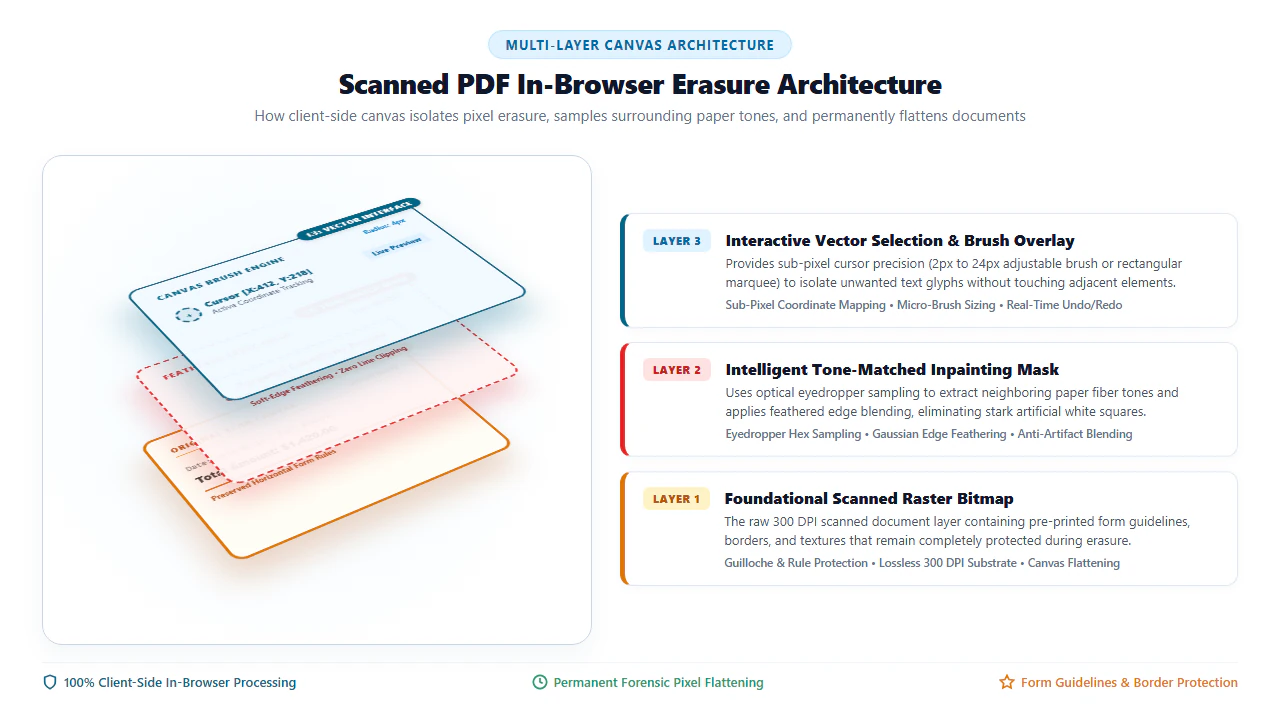
When erasing text in a browser-based PDF application, client-side performance and forensic security depend on a multi-layer canvas architecture. Rather than directly modifying the underlying high-resolution bitmap on every mouse movement—which causes severe lag and browser memory crashes—our engine separates user interaction from raster synthesis:
- Layer 1 (Foundational Raster Substrate): The original scanned page rendered as an uncompressed 300 DPI bitmap buffer inside WebAssembly memory.
- Layer 2 (Inpainting Mask Buffer): An intermediate transparent canvas containing localized color fills, feathered brush strokes, and rectangular white-out polygons mapped to precise sub-pixel coordinates.
- Layer 3 (Interactive Cursor & Overlay): A lightweight UI layer that tracks pointer coordinates, displays dynamic eyedropper reticles, and renders undo/redo bounding boxes in real time.
Upon clicking Export, the engine executes a hardware-accelerated source-over composite operation, permanently flattening Layer 2 into Layer 1. The original pixels under the erased mask are overwritten with irreversible mathematical certainty, ensuring that no forensic software can restore the erased content.
- High-DPI Desktop Viewport & File Loading: Launch Chrome, Edge, Firefox, or Safari on your desktop and drag your scanned document into the canvas. The WebAssembly engine renders the PDF at full 300 DPI resolution, providing crisp, pixel-accurate previews of fine typography and paper fibers.
- Eyedropper Magnifier & Ambient Tone Sampling: Click the eyedropper icon to activate the 8x pixel magnification loupe. Hover over an unprinted region of paper directly adjacent to the text you wish to erase and click once. The exact ambient RGB/Hex color code is automatically assigned to your eraser brush.
- Keyboard-Accelerated Marquee & Brush Erasing: Hold the Spacebar to smoothly pan across dense legal pages. Use rectangular marquee selection to box out entire lines or paragraphs in a single stroke, or tap the brush tool to sweep away isolated stray dots, staple holes, or marginal notes. Press
Ctrl+Z(orCmd+Zon macOS) to instantly revert any misaligned strokes. - Zero-Latency WebAssembly Flattening & Export: Click Download Clean PDF. The desktop engine flattens all inpainting layers into the root bitmap stream in milliseconds, stripping obsolete OCR text coordinates and saving the sanitized document directly to your local drive without remote server latency.
- Cloud-Free Mobile Document Capture & Ingestion: Open Safari on iOS or Chrome on Android and tap Select Document. Import your scanned PDF or captured camera document photo directly from the Files app, iCloud Drive, Google Drive, or camera photo album.
- Responsive Multi-Touch Pinch-to-Zoom: Use standard two-finger pinch-to-zoom gestures to zoom into small contract clauses, receipt line items, or signatures. The mobile canvas maintains 60fps pan and zoom fidelity without freezing touch responsiveness.
- Fingertip Brush Radius & Touch Eyedropper Sampling: Tap the color palette icon to pick up ambient paper color, or tap the eyedropper and touch a blank area of the document. Adjust the brush diameter slider with your thumb and gently sweep over unwanted words, phone numbers, or pen marks with your fingertip.
- In-Memory Mobile Download: Tap Download PDF. The mobile browser compiles the sanitized PDF entirely within local device RAM using 0MB of mobile cellular data, saving directly into your smartphone's "Files" or "Downloads" folder ready for instant email attachment.
Enterprise Use Cases & Irreversible Privacy Guarantee
Document sanitization and text erasing are critical operations across commercial, legal, and governmental sectors. Applying precision client-side raster erasing solves distinct operational bottlenecks across major enterprise use cases:
Scenario 1: Reusable Legal & Corporate Templates
Law firms and corporate procurement teams frequently encounter historical master service agreements, non-disclosure agreements, and commercial leases where original editable Word files have been lost. Retyping complex multi-page contracts from scratch is labor-intensive and introduces risk of typographical errors. By using ambient-matched erasing, paralegals cleanly wipe party names, execution dates, and monetary amounts from the scanned template, then type updated terms directly into the cleared zones to generate fresh, professional contracts in minutes.
Scenario 2: Regulatory & HIPAA Compliance Sanitization
Healthcare organizations, financial institutions, and human resources departments routinely share diagnostic reports, bank statements, and employment records for audit review or litigation discovery. Transmitting unredacted records containing Social Security Numbers, patient birthdates, or credit balances violates strict federal compliance mandates (including HIPAA and the Gramm-Leach-Bliley Act). Client-side erasing permanently destroys identifying pixel data in local memory, eliminating the risk of regulatory fines or data exposure.
Scenario 3: Real Estate Deeds & Architectural Blueprints
Title companies, civil engineering teams, and county recording offices frequently process scanned property deeds, land surveys, and architectural plat maps with handwritten surveyor notes, superseded dimensions, or outdated municipal stamps. Precision micro-erasing allows surveyors to remove isolated markings without breaking fine dimensional guideline rules or property boundary lines.
100% Client-Side Privacy Guarantee: Irreversible Local Pixel Destruction
Your confidential legal exhibits, medical histories, and audited financial statements are never transmitted across the internet. EditScannedPDF.com executes all rendering, tone matching, and raster flattening algorithms entirely within your web browser's sandboxed WebAssembly execution environment. Files remain in local device memory, guaranteeing complete regulatory compliance with HIPAA, GDPR, GLBA, and attorney-client work-product confidentiality rules.
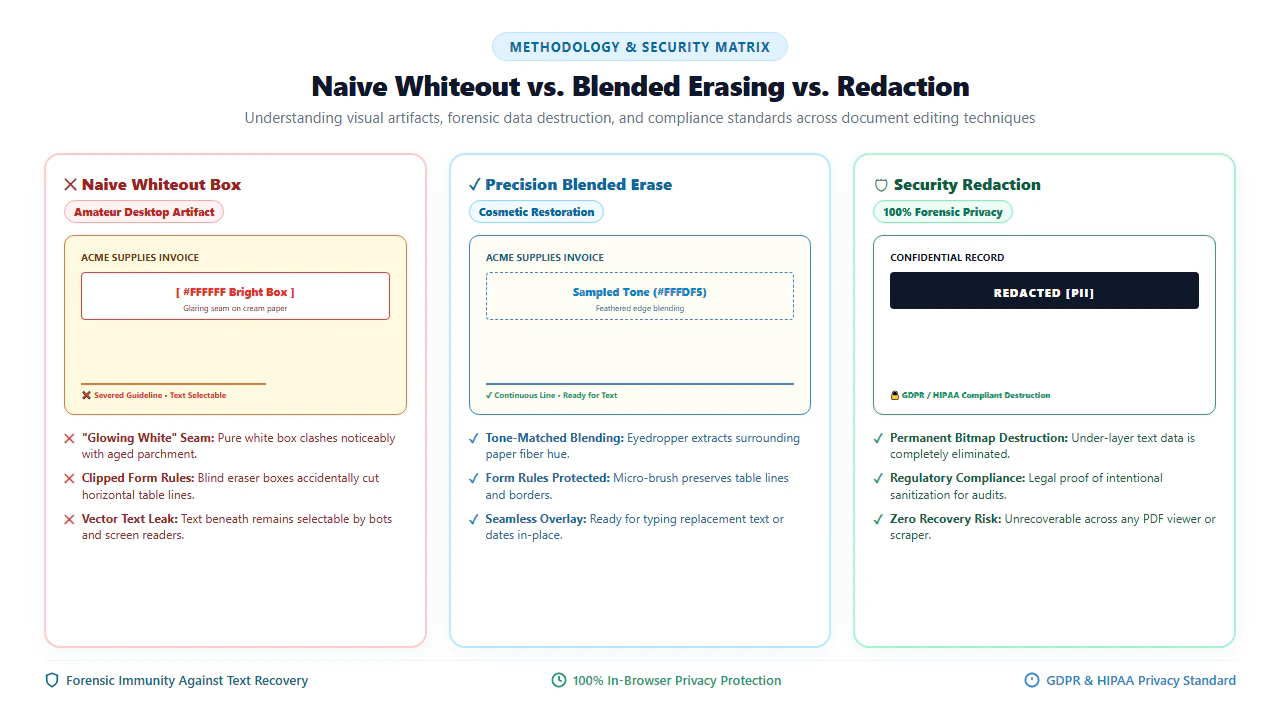
Text Erasure vs. Security Redaction Matrix
Consult this comparison matrix to select the appropriate methodology based on document purpose, visual requirements, and legal compliance obligations:
Quick Fix & Recommended Companion Tools
Choose the specialized browser tool below tailored to your specific document challenge and workflow requirement:
Deep Architecture, Inpainting & Statutory Standards
Digital document restoration differs dramatically from simple vector masking. When an application attempts to erase scanned text by placing a vector polygon over a raster image, the underlying data remains fully present in the PDF file stream. Security researchers and forensic investigators routinely uncover sensitive records from poorly sanitized files using three simple steps:
- PDF Stream Inspection: Opening the PDF in a text editor or analysis tool and inspecting the
/Contentsobject stream. If text was masked rather than destroyed, the underlying ASCII or UTF-8 characters remain visible in plain text. - Annotation Removal: Stripping the
/Annotsdictionary from the PDF page object, instantly removing visual whiteout boxes and exposing the unaltered original scan underneath. - Layer Extraction: Utilizing command-line utilities (such as
pdfdetachorpdftotext) to extract invisible OCR character layers that amateur redaction tools failed to scrub.
To eliminate these vulnerabilities, our client-side WebAssembly engine operates exclusively at the raster pixel level. By executing Bilinear Inpainting and Gaussian Edge Feathering, the engine interpolates boundary luminance values across the erased region while permanently deleting the target bitmap pixels from the page dictionary.
verified Pro Tip: Raster Flattening & Hidden OCR Layer Purging
When modifying scanned PDFs containing a searchable OCR text layer, placing a visual white-out rectangle over an error does not remove the invisible text coordinate data stored in the PDF text matrix. Always use an in-browser editor that permanently re-rasterizes the modified canvas and strips obsolete OCR text tokens over erased zones, preventing sensitive terms from being discovered through text search or copy-paste operations.
gavel Statutory Legal Compliance & Evidentiary Notice: Legitimate Document Sanitization vs. Unlawful Forgery
Authorized Document Redaction Standards: Under the Freedom of Information Act (FOIA, 5 U.S.C. § 552), HIPAA Privacy Rule (45 CFR § 164.514), and Federal Rule of Civil Procedure 5.2, entities are legally required to redact personally identifiable information (PII)—including Social Security numbers, taxpayer identification numbers, financial account details, and medical records—prior to public dissemination or court filing. Legitimate redaction requires permanent, irreversible data destruction to ensure protected information cannot be recovered.
Severe Criminal Penalties for Document Forgery & Spoliation: Digitally erasing authentic terms, modifying contractual liabilities, fabricating financial balances, altering academic transcripts, or manipulating certified government records for fraudulent or deceptive purposes constitutes serious criminal conduct under 18 U.S.C. § 1001 (False Statements), 18 U.S.C. § 1519 (Destruction, Alteration, or Falsification of Records in Federal Investigations), and state forgery statutes. You must only erase or redact documents that you legally own or are officially authorized to administer.
checklist Key Takeaways for Erasing Scanned PDF Text
- Eyedropper Tone Matching: Sample local ambient paper color (ivory, cream, gray) rather than using pure #FFFFFF white to eliminate visible rectangular seams.
- Destructive Canvas Flattening: Permanently overwrite underlying raster pixels upon export, rendering erased content forensically unrecoverable.
- Purge Hidden OCR Text Streams: Strip invisible searchable text tokens corresponding to erased zones to eliminate copy-paste and search data leaks.
- 100% Client-Side Privacy: Execute the entire erasing pipeline inside local browser WebAssembly memory without sending sensitive records to remote cloud servers.
AI Overview Capsule: Scanned PDF Text Erasure
To erase or white out text in a scanned PDF, load your document into our client-side editor. Use the eyedropper to sample surrounding paper tones, select the micro-eraser brush or rectangular marquee tool, sweep over unwanted words or signatures, and export the document. The engine permanently overwrites bitmap pixels and purges hidden OCR text in local browser RAM with 100% data privacy.
Erase, Redact, or White Out Scanned PDF Text in Seconds
Clean up errors, sanitize sensitive data, and prepare reusable templates with 100% client-side privacy.
ink_eraser Start Erasing Scanned PDF NowFrequently Asked Questions
Is whited-out text completely unrecoverable in the exported PDF?
Yes. When you download your document from EditScannedPDF.com, our client-side WebAssembly engine executes a destructive raster flattening routine. The canvas permanently overwrites the underlying bitmap pixel values with the replacement background tone and completely strips obsolete OCR text coordinates. There are no underlying vector objects, hidden layers, or restorable pixel streams left in the exported PDF file.
Why does pure white whiteout look bad on scanned paper?
Physical paper sheets captured through optical scanners or smartphone cameras are almost never sterile pure white (#FFFFFF). Ambient lighting, paper pulp yellowing, and optical sensor exposure introduce warm ivory, pale cream, or light gray values (such as #FAF8F2). Applying a stark #FFFFFF box creates a noticeable rectangular contrast artifact. Using our built-in eyedropper tool samples the authentic local paper hue, making the erasure patch virtually indistinguishable from surrounding paper.
Can I erase text and type replacement words in the exact same position?
Yes. After using the eraser tool to cleanly white out unwanted text, switch to the 'Type' or 'Add Text' tool in our Edit Scanned PDF Online workspace. Click directly over the cleared area, select a matching font style, adjust size and baseline position, and type your replacement text seamlessly into the document.
What is the difference between cosmetic text erasing and security redaction?
Cosmetic text erasing blends out typographical errors, outdated dates, or old names using ambient paper tone matching so reusable templates look pristine and unedited. Security redaction explicitly indicates data withholding using solid black blocks or FOIA exemption codes for legal compliance, while permanently destroying both the visual raster pixels and underlying OCR searchable text streams.
Does erasing text also remove the hidden OCR searchable text layer?
Yes. Our client-side editor ensures that when you erase or white out text on a scanned document, the underlying OCR text coordinates corresponding to the erased bounding box are scrubbed or re-rasterized upon export. This prevents third parties from selecting, copying, or extracting erased words via search tools or command-line utilities.
Can I erase handwriting, stamps, and signatures as easily as printed text?
Absolutely. Because scanned PDF documents are treated as raster image matrices, the eraser brush and rectangular marquee tools operate directly on pixel color data. You can erase ballpoint pen ink, rubber stamps, colored highlighter marks, or pencil notations just as effectively as machine-printed typography.
Are my private documents or sensitive redacting records uploaded to any server?
No. EditScannedPDF.com executes all rendering, tone matching, erasing, and PDF flattening operations 100% locally in your web browser using WebAssembly and HTML5 Canvas. Your documents never leave your device memory, guaranteeing complete privacy and full compliance with HIPAA, GDPR, and legal confidentiality standards. You can also read our complete walkthrough on how to edit a scanned PDF document.