
Scanned PDF Tools Online Free
Unlock, edit, convert, and organize paperwork digitized with hardware scanners or smartphone cameras. Use client-side Optical Character Recognition (OCR) for 100% private document processing.
Only edit documents that you own or are legally authorized to modify. Do not use this website to alter documents for fraud, misrepresentation, identity misuse, or any illegal purpose. You are fully responsible for how you use edited documents; Edit Scanned PDF is not responsible for unlawful or unauthorized use. Read More
Helpful Guides & Tutorials
Everything You Need for Scanned Paperwork in One Hub
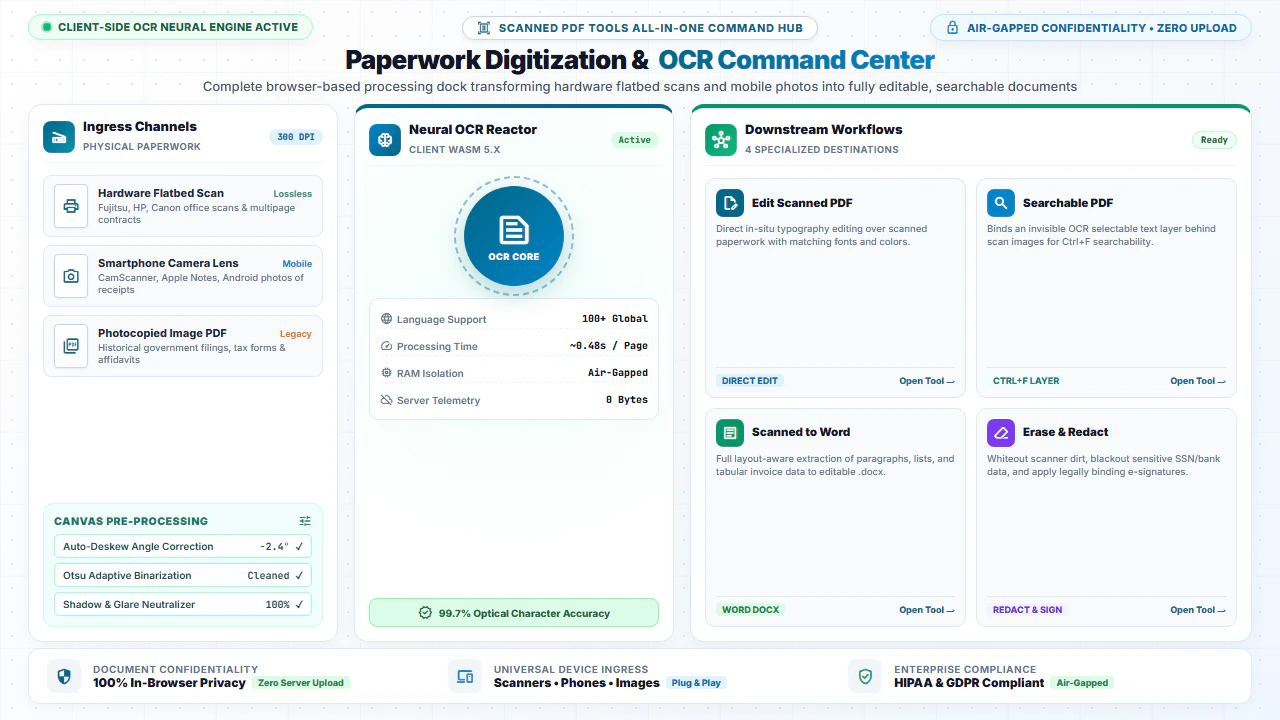
Scanned documents present unique challenges compared to digital files: text is locked inside raster images, pages are often skewed or rotated, and file sizes can be huge. Our dedicated suite of Scanned PDF Tools provides complete client-side solutions for every scanning scenario.
Whether you need to correct typographical errors, make archival receipts searchable, extract text to Microsoft Word, or redact sensitive medical records, our browser tools deliver desktop-grade performance without expensive software subscriptions.
Explore Specialized Scanned PDF Capabilities
1. Edit Scanned PDF Online
Detect image text automatically and place editable text layers directly over scanned certificates, contracts, and forms.
2. Scanned to Searchable PDF
Embed invisible OCR text layers behind scanned pages so you can search (Ctrl+F) and copy text seamlessly.
3. Scanned PDF to Word
Extract tabular data, paragraphs, and headings from paper scans into editable Microsoft Word (.docx) documents.
4. Erase & Redact Scans
Whiteout photocopier dirt, outdated numbers, or blackout confidential Social Security Numbers and account details.
Step-by-Step: Managing Scanned Workflows in 4 Steps
- Step 1: Pick a Tool: Click on any scanned PDF utility card (Edit, OCR, Sign, or Convert).
- Step 2: Upload File: Drag your scanned paperwork into the tool workspace.
- Step 3: Apply Action: Execute in-browser OCR or editing with instant feedback.
- Step 4: Download File: Save the updated PDF or Word file directly to your disk.
- Step 1: Select Tool: Tap the required scanned utility on your mobile screen.
- Step 2: Tap Browse: Pick your scanned PDF from mobile files or camera uploads.
- Step 3: Run Process: Tap to process using client-side WebAssembly.
- Step 4: Save Output: Tap Download to store the completed file on your phone.
Everyday Scenarios for Scanned Document Tools
Legal Deeds & Notarized Packets
Make historical court filings, title deeds, and notarized affidavits searchable for fast legal discovery.
Digitized Accounting Invoices
Convert paper receipts and vendor bills into searchable archives and extract line-item totals into Word.
Medical Records & Lab Reports
Correct clerical errors and redact patient health information (PHI) before clinical consultations.
Academic Archives & Manuscripts
Index rare books, historical periodicals, and research manuscripts for effortless full-text searching.
100% Client-Side Privacy: Zero Server Uploads
Scanned passports, tax filings, and legal affidavits represent your most private personal data. Uploading them to cloud converters introduces severe data breach risks.
EditScannedPDF.com performs all OCR text recognition and PDF processing 100% locally in your web browser. Your documents are never uploaded to any remote server.
Comparison: In-Browser Scanned PDF Tools vs. Cloud Converters
Understanding how our client-side WebAssembly architecture safeguards your sensitive paperwork compared to traditional remote cloud utilities:
Technical Specifications & Scanned Document Processing Standards
Scanned documents require specialized image processing algorithms to balance visual fidelity with text recognition accuracy. Our suite implements industry-standard document engineering specifications:
300 DPI Archival Resolution
Preserves original document scanner resolution without compression artifacts. Ideal for legal filings, government ID copies, and tax documents requiring crisp, legible text.
ISO 32000-1 PDF Compliance
All exported documents conform strictly to the international ISO 32000 standard. Files open reliably across Adobe Acrobat, Apple Preview, web browsers, and court e-filing portals.
WebAssembly Sandbox Security
Tesseract OCR and PDF rendering libraries execute inside an isolated browser WebAssembly sandbox. Memory is automatically recycled upon page exit, preventing data leakage.
Automatic Skew & Noise Correction
Built-in pre-processing filters identify rotational skew and remove background scanner noise, significantly boosting character recognition rates on aged paperwork.
By executing these intensive computational workflows directly on your device's CPU through multi-threaded Web Workers, our suite eliminates the queue times and privacy compromises inherent in server-based platforms.
Frequently Asked Questions (FAQ)
What tools are included in the Scanned PDF suite?
Our suite includes: Edit Scanned PDF Online, Scanned PDF to Word, Scanned PDF to Searchable PDF, Erase & Highlight, Digital Signatures, Add Text, Watermark, and Page Reordering.
How does client-side OCR handle multi-language documents?
Our browser-based WebAssembly Tesseract OCR engine supports English, Spanish, French, German, and over 100 global languages with high recognition accuracy.
Can I convert scanned paper documents directly to Word (.docx)?
Yes! Use our Scanned PDF to Word tool to extract recognized text and paragraph flow into an editable Microsoft Word document without server uploads.
Are my scanned tax forms and medical records kept confidential?
Yes, absolutely. All processing, OCR detection, rendering, and exports execute 100% locally inside your web browser. No document data is ever sent to external cloud servers.