
Why Filling Scanned W-9 Forms Is a Headache (And the Secure Solution)
Every year, millions of independent contractors, freelancers, gig workers, and commercial service providers across the United States face an urgent administrative chore: executing IRS Form W-9 (Request for Taxpayer Identification Number and Certification). Whenever an individual or business entity earns $600 or more in non-employee compensation, the paying company's accounts payable department is legally mandated to obtain a signed Form W-9 before issuing disbursements. Without a valid W-9 on file, corporate finance teams must issue Form 1099-NEC at year-end and withhold a mandatory 24% backup tax from your invoices. With our scan PDF editor, everything runs locally in your browser with zero file uploads.
However, clients and hiring agencies frequently transmit Form W-9 as a flat, scanned paper document or raster PDF image. Unlike interactive AcroForms generated natively by the IRS, scanned W-9s contain zero clickable form fields, zero interactive text boxes, and zero electronic signature hooks. When you click on the document lines in standard PDF viewers, nothing happens: the entire document is locked into a static image bitmap.
This technical roadblock leads many professionals down two hazardous paths:
- The Inefficient Analog Loop: Printing the form on a physical printer, filling out the small line boxes by hand with an ink pen, signing the bottom certification, scanning the paper back to a computer via a flatbed scanner or phone camera, and manually cropping the skewed result. This wastes valuable billing hours and produces grainy, hard-to-read tax records that trigger administrative rejection.
- The Unsecured Cloud Converter Hazard: Uploading the document to third-party commercial cloud PDF editors. Form W-9 represents the crown jewel of personal data: your full legal name, home address, and 9-digit Social Security Number (SSN) or Employer Identification Number (EIN). Uploading this document to remote servers exposes your household to identity theft, intermediate server caching, and corporate data breaches.
Fortunately, modern web technology provides an elegant, 100% private alternative. With EditScannedPDF.com, you can type directly onto scanned form lines, check tax classification boxes with precision, input your TIN, and apply an IRS-compliant handwritten digital signature—all executing inside your local browser memory via compiled WebAssembly with zero file uploads.
4 Steps to Fill and Sign Scanned W-9 Forms Online
Completing a flat scanned W-9 takes less than three minutes without downloading software or registering an account. Follow this standardized four-step workflow to complete your tax certification with total data confidentiality: For deeper troubleshooting, see our guide on how to edit a scanned certificate PDF.
Load Scanned W-9 in Local RAM
Open EditScannedPDF.com and launch the Digital Signature or Add Text tool. Drag and drop your scanned Form W-9. The file loads instantly in isolated browser memory with zero cloud transfer.
Type Taxpayer Details & Checkboxes
Click on Line 1 to position your legal name. Type your DBA or business entity on Line 2, input your address, and place crisp checkmark glyphs in the appropriate tax classification box.
Input Part I Tax ID (SSN or EIN)
Enter your 9-digit Taxpayer Identification Number into the designated Part I grid. For sole proprietors, using an EIN protects your private Social Security Number from client exposure.
Sign Certification & Export Flattened PDF
Open the Digital Signature module to draw or insert your handwritten signature on the Line Part II certification. Add the current date and export a tamper-proof flattened PDF.
Technical Under-the-Hood: 3D Pipeline & Platform Workflows
When completing an unfillable scanned tax form, your web browser orchestrates an advanced three-tier execution pipeline. Traditional PDF viewers struggle with scanned forms because the document content is encoded as a single flat raster image object (XObject) without an underlying interactive AcroForm structure. The diagram below details how our client-side WebAssembly engine bridges static paper scans and legally binding, tamper-proof tax deliverables:
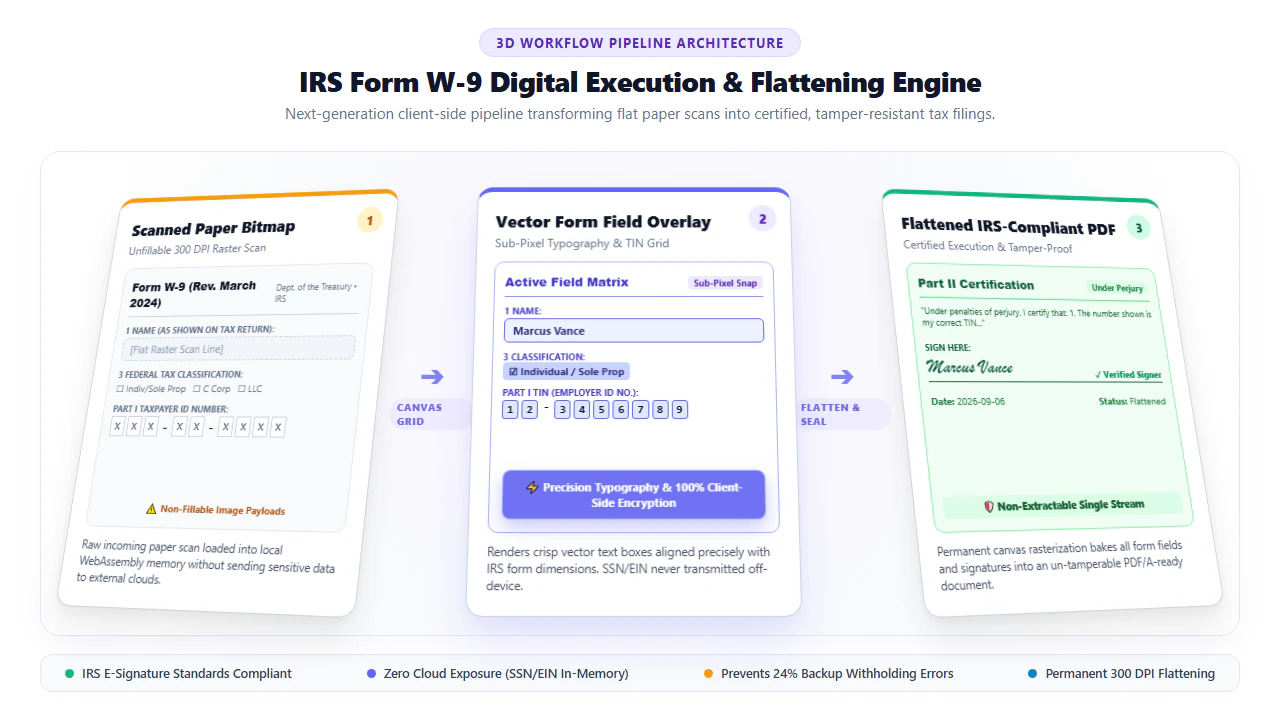
As visualized in the 3D pipeline architecture above, Form W-9 completion executes through three rigorous stages:
- Stage 1: 300 DPI Scanned Paper Bitmap: The original document is parsed into client RAM as an uncompressed 300 DPI raster canvas. Rather than sending the file to an external OCR server, our local WebAssembly module analyzes optical page geometry directly on your machine.
- Stage 2: Dynamic Vector Field Overlay: An interactive HTML5 Canvas coordinate system is projected over the raster page. When you type your name on Line 1, address on Lines 5–6, or digits into the TIN grid, typographic elements are rendered with sub-pixel alignment. All keystrokes and signature vectors exist strictly in volatile browser RAM.
- Stage 3: Permanent Raster Flattening: Once you click Download, the engine merges the vector typographic layers, checkbox graphics, and signature Bézier curves into the underlying pixel array. The output file is rendered as a clean, standardized PDF conforming to ISO 32000-1. Because annotation layers are permanently baked, third parties cannot click into or isolate your signature graphic.
Optimized for Precise Desktop Keyboard & Mouse Control (Windows, macOS, Linux, Chromebook):
- Sub-Pixel Text Baseline Alignment: Desktop users benefit from magnetic guidelines that snap typed names and addresses precisely onto printed form lines, eliminating crooked baseline misalignments.
- Numerical TIN Grid Spacing: Use the dedicated character spacing tool to align individual digits of your Social Security Number or Employer Identification Number into the pre-printed individual boxes of Part I.
- High-Resolution Signature Drawing: Draw your signature with a mouse or trackpad, or upload a clean photo of your real ink signature. Our engine removes background paper grayness and renders dark vector strokes.
- Zero Cloud Data Transfer: Network inspection via browser DevTools confirms that 0 bytes of your tax ID or personal information leave your machine.
Optimized for On-the-Go Touchscreen Execution (iPhone, iPad, Android):
- Pinch-to-Zoom Field Inspection: Effortlessly zoom into specific form sections on your mobile screen to position text boxes and verify numerical accuracy in Part I.
- Finger & Stylus Signature Execution: Draw natural, fluid signatures using your smartphone touchscreen, Apple Pencil, or Android stylus. Variable stroke-width simulation replicates genuine pen pressure.
- Camera Capture Uploads: Snap a photo of a physical paper W-9 sent by your client. The mobile engine automatically deskews the photo, normalizes contrast to clean white, and readies it for text entry.
- Instant File Attachment: Save the flattened PDF directly to your device's Files or Downloads folder, ready to attach to an outgoing email or client onboarding portal.
IRS Form W-9 Classification & Tax ID (TIN) Decision Guide
Completing the technical portion of Form W-9 requires meticulous compliance with IRS entity matching rules. Corporate accounting systems cross-reference incoming W-9 data against the IRS TIN Matching Program database. A single clerical mismatch between the name on Line 1 and the federal tax identification number in Part I triggers an automated IRS B-Notice, legally forcing your client to withhold 24% of your total earnings.
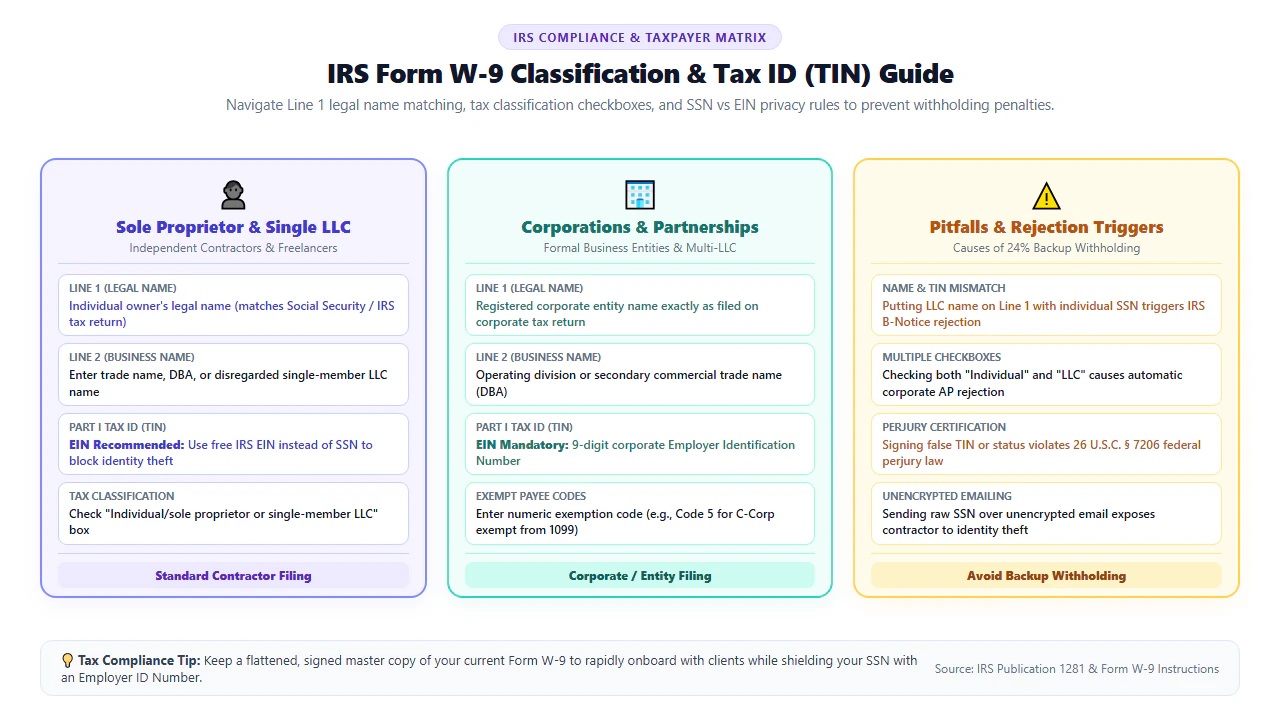
Review the three standard tax classification categories and their exact filling protocols:
1. Sole Proprietor & Independent Contractor
Line 1 Legal Name: Enter your full individual legal name matching your Form 1040 tax return. Enter your business trade name or DBA on Line 2. In Part I, you may enter your SSN or an EIN registered under your individual name.
2. Single-Member Disregarded LLC
Disregarded Entity Rule: Enter the individual owner's legal name on Line 1. Enter the LLC entity name on Line 2. Check the "Individual/sole proprietor or single-member LLC" box, NOT the Limited Liability Company box.
3. Corporation, Partnership & Multi-Member LLC
Corporate Filers: Enter the exact registered entity name on Line 1. Check the appropriate corporate tax classification (C Corp, S Corp, Partnership). Part I requires the entity's Employer Identification Number (EIN).
Form W-9 Entity Classification & B-Notice Prevention Matrix
To ensure your W-9 is processed without administrative delays or payment holds, reference the compliance matrix below before signing:
| Entity Type | Line 1 (Mandatory) | Line 2 (Business Name) | Mandatory TIN Format | Common B-Notice Error & Penalty |
|---|---|---|---|---|
| Individual / Sole Proprietor | Individual's Legal Name | DBA / Trade Name (Optional) | SSN or Sole Proprietor EIN | Entering a business trade name on Line 1 with an individual SSN causes an immediate TIN mismatch. |
| Single-Member LLC (Disregarded) | Owner's Individual Legal Name | LLC Registered Entity Name | Owner's SSN or Individual EIN | Entering the LLC name on Line 1 triggers automated IRS rejection and 24% backup withholding. |
| Multi-Member LLC (Partnership) | LLC Legal Business Name | Operating Name (If different) | LLC Partnership EIN (9 digits) | Entering individual partner SSNs instead of the company EIN invalidates the partnership filing. |
| Corporation (C Corp or S Corp) | Exact Corporate Registered Name | Division or DBA Name | Corporate EIN (9 digits) | Failing to check the C or S Corp box results in clients unnecessarily issuing 1099-NEC forms. |
| General Partnership | Partnership Legal Name | Trade Name (If applicable) | Partnership EIN (9 digits) | Entering individual partner names on Line 1 breaches partnership tax accounting rules. |
Recommended Companion Tools for Tax Document Preparation
Executing tax documents often requires a suite of specialized browser tools. Discover our companion utilities for end-to-end tax compliance:
| Tax / Document Task | Recommended Tool | Browser Function | Contractor Benefit |
|---|---|---|---|
| Apply Legally Binding E-Signatures | Digital Signature Tool | Draws, types, or uploads ink signatures into Part II certification. | Satisfies IRS e-signature tamper-resistance requirements. |
| Type Name, Address & Numbers | Add Text to PDF | Positions scalable vector text cleanly on scanned form lines. | Delivers crisp 300 DPI typography that accounts payable can read. |
| Redact SSN for Archival Records | Redact & Erase PDF | Permanently masks SSN/EIN on local reference copies. | Prevents identity theft when archiving vendor records. |
| Encrypt W-9 Before Emailing | Lock PDF (AES-256) | Applies military-grade password encryption to completed W-9. | Guarantees privacy when sending tax documents across email. |
| Compress High-Resolution Scans | Compress PDF Free | Shrinks 25MB scanner files down to under 500KB without blurring. | Ensures files breeze past corporate email attachment limits. |
IRM Signature Rules, Pro Engineering Tip & Statutory Perjury Notice
Under Internal Revenue Manual (IRM 10.10.1), electronic signatures applied to Form W-9 are legally recognized by the federal government when the execution environment fulfills four foundational standards:
- Signer Authentication: The system must link the signature action to the specific legal identity declared on Line 1.
- Demonstrated Intent: The signer must execute a deliberate affirmative action (drawing a signature stroke or typing an acknowledged name).
- Signature Attribution: The signature must be logically associated with the specific text and certifications of Part II.
- Tamper-Proof Integrity: The executed document must be locked against subsequent alteration, which our client-side raster flattening routine guarantees.
If you operate as an independent contractor, sole proprietor, or freelancer, you are not legally required to give your personal Social Security Number to clients. You can visit IRS.gov and apply online for a free Employer Identification Number (EIN) in under ten minutes. Once issued, you can enter your EIN in Part I of Form W-9 while keeping your individual legal name on Line 1. This prevents your private SSN from sitting on external accounting servers or passing through unencrypted vendor emails.
Part II of Form W-9 requires certification under penalties of perjury that the taxpayer identification number provided is correct and that the payee is not subject to backup withholding. Willfully submitting a false or fictitious TIN, fabricating a legal identity, or signing a fraudulent W-9 constitutes criminal tax fraud under 26 U.S.C. § 7206 and federal identity theft under 18 U.S.C. § 1028, punishable by criminal fines up to $100,000 and up to 3 years federal imprisonment. Always complete Form W-9 with authentic legal credentials.
- check_circle No Printing Required: Type text, check entity boxes, and apply signatures directly onto flat scanned W-9 PDFs.
- check_circle Line 1 Name Rules: Sole proprietors and disregarded single-member LLCs must enter the owner's legal name on Line 1 to prevent B-Notices.
- check_circle Permanent Raster Flattening: Bakes signature strokes and TIN digits into underlying pixels so third parties cannot tamper with annotations.
- check_circle 100% In-Browser Privacy: WebAssembly execution ensures sensitive SSNs and EINs never upload to remote servers.
To fill out and sign a flat, unfillable scanned IRS Form W-9 without printing or buying desktop software, drag the document into EditScannedPDF.com. Position text fields on Line 1 (Legal Name), Line 2 (DBA), and address lines, select the appropriate federal entity classification checkbox, and enter your 9-digit SSN or EIN in Part I. Apply a legally binding handwritten e-signature in Part II and export an official flattened PDF—completely free and 100% private in browser memory.
Ready to Fill and Sign Your Scanned W-9?
Type your legal name, enter your TIN, and apply an IRS-compliant electronic signature in your browser memory. 100% private, free, and secure.
assignment_turned_in Fill & Sign Scanned W-9 Now FreeFrequently Asked Questions About Filling & Signing Form W-9
Does the IRS legally accept electronic signatures on Form W-9?
Yes. Under IRS Electronic Signature Guidelines (Internal Revenue Manual 10.10.1), electronic signatures on Form W-9 are legally binding provided the signature establishes signer identity, demonstrates intent to sign, is attributed to the tax certification, and locks the document against post-signature tampering.
Is it safe to type my Social Security Number (SSN) or EIN into EditScannedPDF?
Yes, 100% safe. EditScannedPDF operates entirely within client-side browser memory via WebAssembly and HTML5 Canvas. Your 9-digit SSN, EIN, legal name, and home address are never uploaded to external servers, cloud databases, or third-party networks.
Should a freelancer or independent contractor use an SSN or EIN on Form W-9?
For identity theft protection, obtaining a free Employer Identification Number (EIN) from IRS.gov is strongly recommended. As a sole proprietor or independent contractor, entering an EIN in Part I protects your personal Social Security Number from being exposed to client accounting staff or stored on vendor databases.
What happens if my Line 1 legal name does not match my TIN?
A name and TIN mismatch triggers an automated IRS B-Notice to your payer. Under federal tax law, receiving a second B-Notice legally compels the paying company to institute mandatory 24% backup withholding from all future disbursements until you provide a verified, matching Form W-9.
Can someone copy, extract, or lift my signature from the completed W-9 PDF?
No. When you download your completed W-9 from EditScannedPDF, our engine executes permanent client-side raster flattening. Your signature strokes, typed text, and checkmarks are baked directly into the underlying 300 DPI image pixels, completely eliminating separate vector annotation layers that could otherwise be copied or edited.
How should a single-member LLC fill out Line 1 and Line 2 of Form W-9?
For a single-member LLC treated as a disregarded entity for federal tax purposes, IRS instructions require entering the individual owner's legal name on Line 1. The business name of the LLC must be entered on Line 2 ('Business name/disregarded entity name'). Entering the LLC name on Line 1 with an individual SSN causes an IRS mismatch.
How can I send my completed Form W-9 to my client safely?
Never email a completed Form W-9 as unencrypted plain text over standard email. Use EditScannedPDF's in-browser Lock PDF tool to encrypt the file with AES-256 password protection before attaching it, and transmit the password to your client through a separate out-of-band channel such as SMS, telephone call, or secure portal.